
19. Implementing Platform-Specific Code in Flutter: Customizing App Behavior for Different Platforms
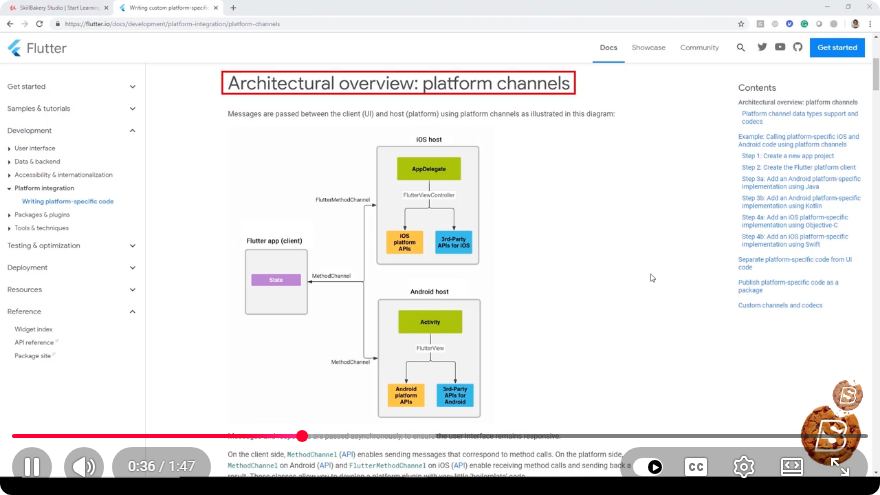
Implementing Platform-Specific Code in Flutter: Customizing App Behavior for Different Platforms
Flutter is a versatile framework that allows developers to create beautiful applications for multiple platforms, including iOS, Android, web, and desktop, from a single codebase. However, there are times when you may need to implement platform-specific features to provide a better user experience or to leverage platform-specific capabilities. In this blog post, we will explore how to implement platform-specific code in Flutter, ensuring your app behaves appropriately across different platforms.
Why Use Platform-Specific Code?
Platform-specific code is essential for several reasons:
- User Experience: Different platforms have unique design guidelines and user expectations. Tailoring your app to these standards can significantly enhance user satisfaction.
- Access to Native Features: Some functionalities, like camera access or file handling, may be implemented differently across platforms. Using platform-specific code allows you to access these native features effectively.
- Performance Optimization: Certain operations may perform better or be more efficient on specific platforms, and platform-specific implementations can leverage these advantages.
Setting Up Platform-Specific Code
Flutter provides a straightforward way to write platform-specific code using the platform package. Below, we outline the steps to implement platform-specific functionality in your Flutter app.
Step 1: Import the Necessary Packages
First, ensure that you have the flutter/foundation.dart package imported into your Dart file. This package enables you to access platform-specific features.
import 'package:flutter/foundation.dart';
Step 2: Check the Current Platform
Use the defaultTargetPlatform variable from the foundation library to determine the current platform. This variable can help you decide which code to execute.
if (defaultTargetPlatform == TargetPlatform.android) {
  // Android-specific code
} else if (defaultTargetPlatform == TargetPlatform.iOS) {
  // iOS-specific code
} else {
  // Fallback for other platforms
}
Step 3: Implement Platform-Specific Code
Let’s say you want to show an alert dialog with a different title depending on whether the app is running on iOS or Android. Here’s how you can do it:
void showPlatformSpecificDialog(BuildContext context) {
  String title;

  if (defaultTargetPlatform == TargetPlatform.android) {
    title = 'Android Alert';
  } else if (defaultTargetPlatform == TargetPlatform.iOS) {
    title = 'iOS Alert';
  } else {
    title = 'Default Alert';
  }

  showDialog(
    context: context,
    builder: (BuildContext context) {
      return AlertDialog(
        title: Text(title),
        content: Text('This is a platform-specific dialog.'),
        actions: <Widget>[
          TextButton(
            child: Text('OK'),
            onPressed: () {
              Navigator.of(context).pop();
            },
          ),
        ],
      );
    },
  );
}
Step 4: Testing Your Code
To ensure your platform-specific code works correctly, test your application on both Android and iOS devices or emulators. Make sure to check that the correct dialog title appears according to the platform, confirming that your implementation behaves as expected.
Best Practices for Platform-Specific Code
- Keep It Minimal: Use platform-specific code sparingly. Most of your code should remain platform-agnostic to maintain a clean and maintainable codebase.
- Use Plugins: Whenever possible, leverage existing plugins that abstract platform-specific implementations. This approach can save time and reduce complexity.
- Organize Your Code: Consider creating separate files or classes for platform-specific code to keep your main codebase clean and easier to navigate.
Conclusion
Implementing platform-specific code in Flutter is a powerful way to enhance the functionality and user experience of your applications. By utilizing the defaultTargetPlatform variable, you can easily tailor your app’s behavior according to the platform it’s running on. Remember to keep your platform-specific code minimal and well-organized, ensuring the maintainability of your codebase.
With these practices in mind, you can create a Flutter application that feels native to each platform while maintaining the benefits of a single codebase. Happy coding!
Connect with SkillBakery Studios
Explore more tutorials, tools, and resources:
Posted by SkillBakery Studios


 Hello, my name is Jack Sparrow. I'm a 50 year old self-employed Pirate from the Caribbean.
No comments:
Post a Comment