
ASP NetMVC Core MVC Introduction
Introduction to ASP.NET Core MVC: A Quick Overview
In today’s blog post, we’ll provide a concise introduction to ASP.NET Core MVC, as highlighted in a brief but informative YouTube video titled "ASP NetMVC Core MVC Introduction." This framework is an excellent choice for building modern web applications and services, and in just a few minutes, we’ll cover the essentials to get you started.
What is ASP.NET Core MVC?
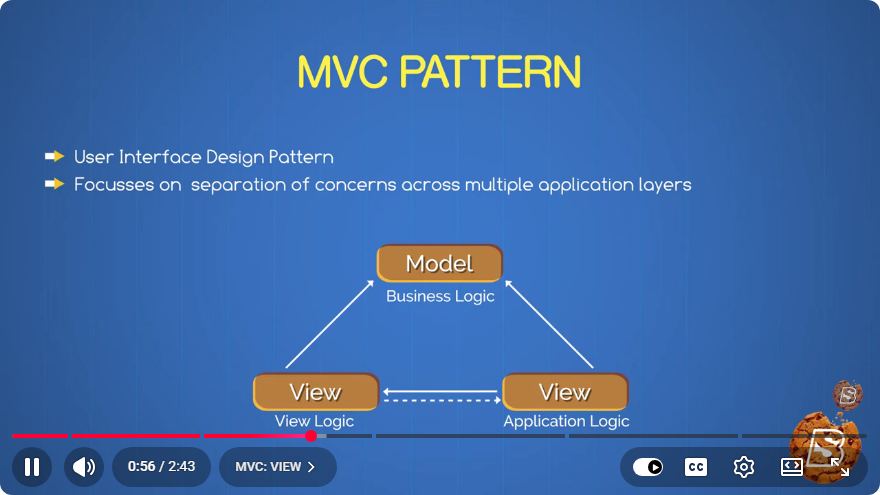
ASP.NET Core MVC is a web framework developed by Microsoft, designed to create dynamic web applications. It follows the MVC (Model-View-Controller) architectural pattern, which separates an application into three main components:
- Model: Represents the data and business logic.
- View: Responsible for the user interface and presentation layer.
- Controller: Handles user input and interacts with the model to render the appropriate view.
This separation of concerns makes ASP.NET Core MVC an ideal choice for building scalable and maintainable applications.
Key Features of ASP.NET Core MVC
1. Cross-Platform
One of the most significant advantages of ASP.NET Core is its cross-platform capability. You can develop and run applications on Windows, macOS, and Linux, providing flexibility in deployment environments.
2. Dependency Injection
ASP.NET Core has built-in support for dependency injection, which enhances testability and maintainability. By using DI, you can easily manage your application's dependencies and promote loose coupling between components.
3. Middleware
ASP.NET Core allows you to build a pipeline of middleware components. Middleware are software components that are assembled into an application pipeline to handle requests and responses. This approach provides a high degree of flexibility in how requests are processed.
4. Razor Views
Razor is a markup syntax that allows you to embed server-based code into web pages. This makes it easy to generate dynamic content using C# and HTML in a streamlined way, helping you create rich web applications efficiently.
Getting Started with ASP.NET Core MVC
To get started with ASP.NET Core MVC, follow these steps:
Prerequisites
Before diving into development, ensure you have the following installed:
- .NET SDK (latest version)
- An IDE or text editor (such as Visual Studio or Visual Studio Code)
Creating a New ASP.NET Core MVC Project
Open your terminal or command prompt.
Run the following command to create a new MVC project:
dotnet new mvc -n MyMvcAppNavigate to your project directory:
cd MyMvcAppLaunch the application:
dotnet runOpen your web browser and navigate to
http://localhost:5000to see your new MVC application in action!
Project Structure
When you create a new ASP.NET Core MVC project, you will notice a well-defined folder structure:
- Controllers: Contains the application’s controllers.
- Models: Contains the data models.
- Views: Holds the Razor view files (.cshtml).
- wwwroot: Serves static files like CSS, JavaScript, and images.
Conclusion
ASP.NET Core MVC offers a powerful framework for building modern web applications. With its cross-platform capabilities, built-in dependency injection, and flexible middleware architecture, it provides developers with the tools needed to create robust applications efficiently.
In just a few minutes, we’ve covered the essentials to help you get started with ASP.NET Core MVC. For more in-depth tutorials and advanced topics, consider exploring the official ASP.NET Core documentation.
Happy coding!
Connect with SkillBakery Studios
Explore more tutorials, tools, and resources:
Posted by SkillBakery Studios


 Hello, my name is Jack Sparrow. I'm a 50 year old self-employed Pirate from the Caribbean.
No comments:
Post a Comment