
JavaScript - Learn Alpine.JS Making Ajax Calls and using x-Init
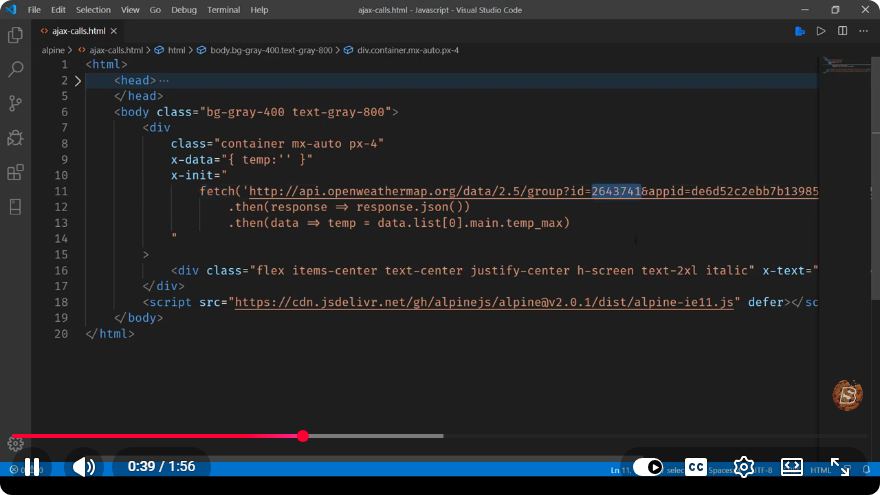
Mastering Alpine.js: Making AJAX Calls and Using x-init
In the dynamic world of web development, frameworks and libraries continually evolve to enhance user experiences. One such lightweight framework is Alpine.js, which brings the reactivity of frameworks like Vue.js and React, but with a much simpler approach. In this tutorial, we will explore how to make AJAX calls using Alpine.js and effectively utilize the x-init directive.
What is Alpine.js?
Alpine.js is a minimal JavaScript framework that allows developers to create reactive components without the overhead of larger frameworks. Its syntax is straightforward and inspired by Vue.js, making it an excellent choice for developers who want to add interactivity to their applications without a steep learning curve.
Setting Up Alpine.js
To get started with Alpine.js, you need to include it in your HTML file. You can do this via a CDN link. Add the following script tag in the <head> section of your HTML document:
<head>
    <script src="https://cdn.jsdelivr.net/npm/alpinejs" defer></script>
</head>
The defer attribute ensures that the script is executed after the document has been fully parsed.
Making AJAX Calls with Alpine.js
AJAX (Asynchronous JavaScript and XML) is used for fetching data asynchronously without refreshing the web page. With Alpine.js, you can make AJAX calls using the x-data and x-init directives. Let's create a simple example to demonstrate this.
Example: Fetching Data from an API
Let's say we want to fetch user data from a public API and display it on our page. Here’s how we can achieve that:
<!DOCTYPE html>
<html lang="en">
<head>
    <meta charset="UTF-8">
    <meta name="viewport" content="width=device-width, initial-scale=1.0">
    <title>Alpine.js AJAX Example</title>
    <script src="https://cdn.jsdelivr.net/npm/alpinejs" defer></script>
</head>
<body x-data="userData()" x-init="fetchUsers()">

    <h1>User List</h1>
    <ul>
        <template x-for="user in users" :key="user.id">
            <li x-text="user.name"></li>
        </template>
    </ul>

    <script>
        function userData() {
            return {
                users: [],
                fetchUsers() {
                    fetch('https://jsonplaceholder.typicode.com/users')
                        .then(response => response.json())
                        .then(data => {
                            this.users = data;
                        })
                        .catch(error => console.error('Error fetching users:', error));
                }
            }
        }
    </script>

</body>
</html>
Breakdown of the Code
HTML Structure: We set up a simple HTML structure with a heading and an unordered list to display user names.
Alpine.js Directives:
x-data="userData()": Initializes the component with theuserDatafunction that returns an object containingusersandfetchUsers().x-init="fetchUsers()": Calls thefetchUsersmethod when the component is initialized.
Fetching Data: Inside the
fetchUsersmethod, we use the Fetch API to make an AJAX call to the placeholder API. On successful response, we convert the data to JSON and assign it to theusersarray.Rendering Data: The
x-fordirective iterates over theusersarray, andx-textdynamically updates the content of each list item.
Using x-init
The x-init directive is extremely useful for executing code when a component is initialized. It can be used for:
- Fetching data
- Setting initial states
- Performing any setup tasks
In our example, x-init is used to call fetchUsers() immediately after the component is created, ensuring that user data is loaded as soon as the page is ready.
Conclusion
Alpine.js is a powerful tool for adding interactivity to your web applications while keeping the codebase lightweight and easy to manage. In this tutorial, we demonstrated how to make AJAX calls and effectively utilize the x-init directive to fetch and display data dynamically.
With Alpine.js, you can build reactive components quickly and efficiently. Experiment with different APIs and functionalities to fully harness the potential of this framework in your projects!
Connect with SkillBakery Studios
Explore more tutorials, tools, and resources:
Posted by SkillBakery Studios


 Hello, my name is Jack Sparrow. I'm a 50 year old self-employed Pirate from the Caribbean.
No comments:
Post a Comment