
JavaScript - Making function arguments mandatory/required
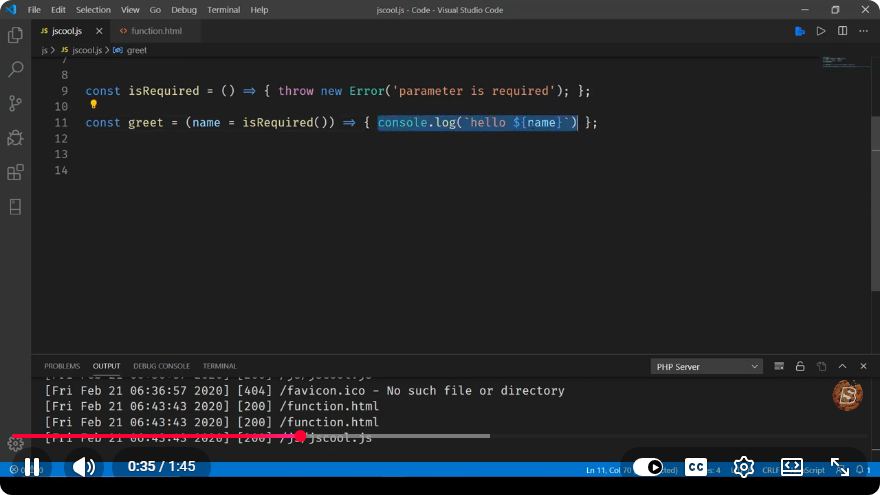
JavaScript: Making Function Arguments Mandatory
In JavaScript, functions can accept a varied number of arguments, but sometimes you may want to ensure that certain arguments are mandatory. This can help prevent bugs and enhance code readability. In this blog post, we'll explore several techniques to enforce mandatory function arguments in JavaScript.
Why Make Function Arguments Mandatory?
Making function arguments mandatory ensures that the function has all the necessary inputs before executing its logic. This practice can help developers:
- Prevent Errors: Avoid unexpected behavior due to missing parameters.
- Improve Code Clarity: Clearly define what inputs are required for a function.
- Encourage Best Practices: Promote careful planning and structure in code design.
Techniques to Enforce Mandatory Arguments
1. Using throw Statement
One simple way to enforce mandatory function arguments is to check their presence at the beginning of the function and throw an error if they are missing.
function multiply(a, b) {
    if (a === undefined || b === undefined) {
        throw new Error("Missing required arguments: a and b are mandatory.");
    }
    return a * b;
}

try {
    console.log(multiply(2)); // Error!
} catch (e) {
    console.error(e.message);
}
In this example, we check if either a or b is undefined. If so, we throw an error, making it clear that both arguments are required.
2. Using Default Parameters with Validation
Another approach is to use default parameters combined with validation. This way, you can provide a meaningful default value while still enforcing the presence of required arguments.
function add(a = null, b = null) {
    if (a === null || b === null) {
        throw new Error("Both arguments are required.");
    }
    return a + b;
}

try {
    console.log(add(5)); // Error!
} catch (e) {
    console.error(e.message);
}
Here, we set default values to null for both parameters. This allows us to identify missing arguments when they are not provided.
3. Using Rest Parameters with Validation
If you want to create a function that can accept an arbitrary number of arguments but still enforce a minimum requirement, you can use rest parameters.
function logMessages(...messages) {
    if (messages.length < 2) {
        throw new Error("At least two messages are required.");
    }
    messages.forEach(msg => console.log(msg));
}

try {
    logMessages("Hello"); // Error!
} catch (e) {
    console.error(e.message);
}
In this example, the function logMessages requires at least two arguments. If the condition is not met, an error is thrown.
4. Using TypeScript for Enforced Types
If you are working with TypeScript, you can enforce mandatory arguments at compile time, making your function signatures clearer.
function divide(a: number, b: number): number {
    if (b === 0) {
        throw new Error("Cannot divide by zero.");
    }
    return a / b;
}

console.log(divide(10, 2)); // 5
// console.log(divide(10)); // Error: Expected 2 arguments, but got 1.
In this case, TypeScript will enforce that both a and b are provided when calling the divide function, preventing runtime errors.
Conclusion
Making function arguments mandatory in JavaScript is a best practice that can lead to cleaner, more reliable code. Whether you choose to check for undefined, use default parameters, or leverage TypeScript's type system, enforcing required arguments can greatly improve the robustness of your functions.
By implementing these techniques, you can ensure that your functions are called with the necessary parameters, making your code easier to maintain and understand. Happy coding!
Connect with SkillBakery Studios
Explore more tutorials, tools, and resources:
Posted by SkillBakery Studios


 Hello, my name is Jack Sparrow. I'm a 50 year old self-employed Pirate from the Caribbean.
No comments:
Post a Comment