
JavaScript - Reduce Function
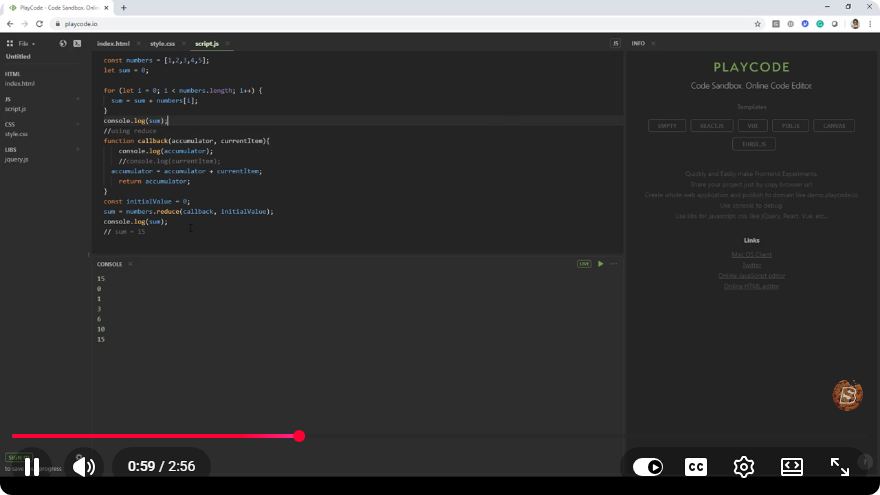
Understanding the JavaScript Reduce Function: A Quick Guide
JavaScript is a versatile programming language that offers a variety of array methods to manipulate data efficiently. One of the most powerful and commonly used methods is the reduce function. In this tutorial, we'll break down what the reduce function is, how to use it, and provide some practical examples to help solidify your understanding.
What is the Reduce Function?
The reduce method is an array function that executes a reducer function on each element of the array, resulting in a single output value. It is particularly useful for aggregating data, such as summing values, flattening arrays, or transforming data structures.
Syntax
The syntax for the reduce method is as follows:
array.reduce((accumulator, currentValue, currentIndex, array) => {
  // Your logic here
}, initialValue);
- accumulator: The accumulated value previously returned in the last invocation of the callback, or
initialValue, if supplied. - currentValue: The current element being processed in the array.
- currentIndex (optional): The index of the current element being processed.
- array (optional): The array reduce was called upon.
- initialValue (optional): A value to use as the first argument to the first call of the callback.
Basic Example: Summing an Array of Numbers
Let's start with a simple example: summing an array of numbers. Here's how you can accomplish this using the reduce method:
const numbers = [1, 2, 3, 4, 5];

const total = numbers.reduce((accumulator, currentValue) => {
  return accumulator + currentValue;
}, 0);

console.log(total); // Output: 15
Explanation
In the example above:
- We declare an array of numbers.
- We call the
reducemethod on thenumbersarray. - The callback function takes two parameters:
accumulatorandcurrentValue. - We initialize the
accumulatorto0. - The function adds each
currentValueto theaccumulator, resulting in the final sum.
More Complex Example: Flattening an Array
The reduce method can also be used to flatten a multi-dimensional array into a single-dimensional array. Here’s how you can do that:
const nestedArray = [[1, 2], [3, 4], [5, 6]];

const flatArray = nestedArray.reduce((accumulator, currentValue) => {
  return accumulator.concat(currentValue);
}, []);

console.log(flatArray); // Output: [1, 2, 3, 4, 5, 6]
Explanation
In this example:
- We have a nested array containing sub-arrays.
- We initialize the
accumulatoras an empty array[]. - The
concatmethod is called to merge eachcurrentValueinto theaccumulator. - The final result is a flattened array.
Using Reduce with Objects
The reduce function is also useful for transforming arrays into objects. Here’s an example where we count the occurrences of items in an array:
const fruits = ['apple', 'banana', 'apple', 'orange', 'banana', 'banana'];

const fruitCount = fruits.reduce((accumulator, currentValue) => {
  accumulator[currentValue] = (accumulator[currentValue] || 0) + 1;
  return accumulator;
}, {});

console.log(fruitCount); // Output: { apple: 2, banana: 3, orange: 1 }
Explanation
In this example:
- We have an array of fruits with duplicates.
- We initialize the
accumulatoras an empty object{}. - For each
currentValue, we either set its count to1or increment its existing count. - The result is an object that shows the count of each fruit.
Conclusion
The reduce function is a powerful tool in JavaScript that allows developers to perform complex data transformations in a concise manner. Whether you're summing numbers, flattening arrays, or counting occurrences, reduce can help simplify your code and improve readability.
By mastering the reduce function, you enhance your capabilities as a JavaScript developer, enabling you to write cleaner and more efficient code. Happy coding!
Connect with SkillBakery Studios
Explore more tutorials, tools, and resources:
Posted by SkillBakery Studios


 Hello, my name is Jack Sparrow. I'm a 50 year old self-employed Pirate from the Caribbean.
No comments:
Post a Comment