
Master Node JS : Nodejs working explained - Web Development
Mastering Node.js: A Quick Guide to Understanding Node.js for Web Development
Node.js has revolutionized web development by allowing developers to use JavaScript on the server side. In this blog post, we’ll explore what Node.js is, how it works, and why it has become a popular choice for building scalable network applications.
What is Node.js?
Node.js is an open-source, cross-platform runtime environment that allows you to execute JavaScript code server-side. Built on Chrome's V8 JavaScript engine, Node.js enables developers to build fast and scalable network applications.
Key Features of Node.js
Asynchronous and Event-Driven: Node.js uses non-blocking I/O operations, which makes it lightweight and efficient. This architecture is ideal for applications that require a lot of concurrent connections.
Single Programming Language: With Node.js, developers can use JavaScript for both client-side and server-side programming, reducing the need to learn multiple languages.
Package Management: Node.js comes with npm (Node Package Manager), which allows developers to easily share and reuse code, making it easier to manage dependencies.
Scalability: Node.js applications can handle a large number of connections simultaneously, making it suitable for applications that require high performance.
How Does Node.js Work?
Event Loop
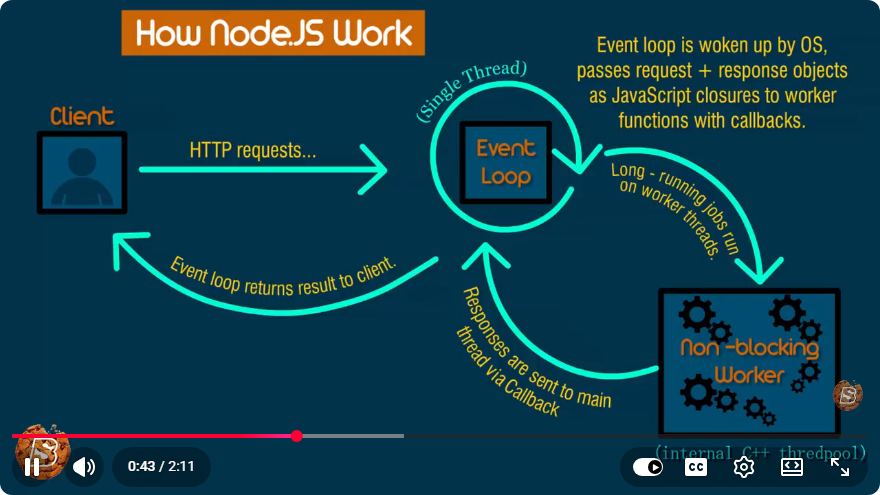
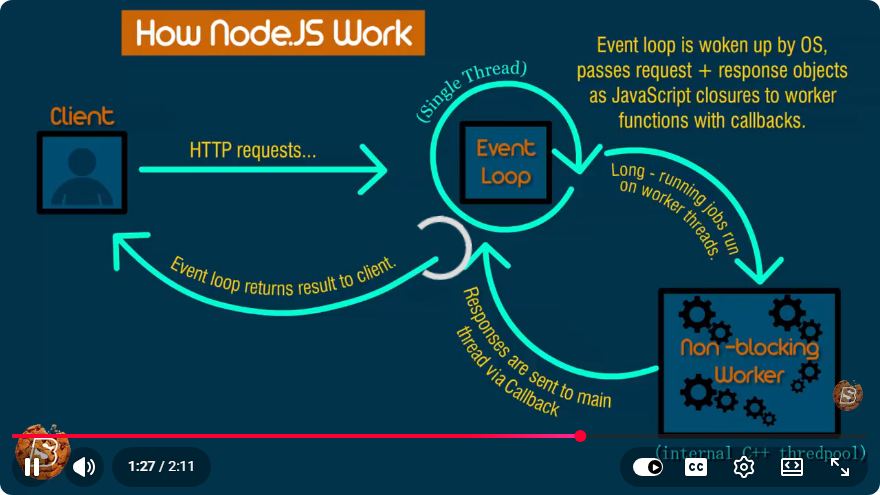
The core of Node.js's architecture is the event loop. This mechanism allows Node.js to perform non-blocking I/O operations by offloading operations to the system kernel whenever possible.
Here’s a simplified explanation of how the event loop works:
- Start: When you run a Node.js application, it initializes the event loop.
- Callbacks: When an asynchronous operation is initiated (like reading a file), Node.js registers a callback and continues executing the next line of code.
- Execution: Once the asynchronous operation is complete, the event loop picks up the callback from the callback queue and executes it.
Example of Asynchronous I/O
Let's see a simple example of asynchronous I/O in Node.js:
const fs = require('fs');

// Non-blocking read
fs.readFile('example.txt', 'utf8', (err, data) => {
    if (err) {
        console.error(err);
        return;
    }
    console.log(data);
});

console.log('This will run while the file is being read.');
In this example, fs.readFile is called to read a file. Instead of waiting for the file to be read (which would block execution), Node.js continues to execute the code that follows, demonstrating the non-blocking nature of its I/O.
Building a Simple Web Server
To illustrate how Node.js can be used in web development, let’s create a simple web server.
Step 1: Setting Up Node.js
Make sure you have Node.js installed. You can download it from nodejs.org.
Step 2: Create a New Project
Create a new directory for your project:
mkdir my-node-server
cd my-node-server
Initialize a new Node.js project:
npm init -y
Step 3: Write the Server Code
Create a file named server.js and add the following code:
const http = require('http');

const hostname = '127.0.0.1';
const port = 3000;

const server = http.createServer((req, res) => {
    res.statusCode = 200;
    res.setHeader('Content-Type', 'text/plain');
    res.end('Hello, World!\n');
});

server.listen(port, hostname, () => {
    console.log(`Server running at http://${hostname}:${port}/`);
});
Step 4: Run Your Server
In your terminal, run the server using the command:
node server.js
You should see a message indicating that the server is running. Open your web browser and navigate to http://127.0.0.1:3000/. You should see "Hello, World!" displayed on the page.
Conclusion
Node.js is a powerful tool for web development, allowing developers to build fast and scalable applications with JavaScript. Its non-blocking I/O model and extensive package ecosystem make it a popular choice for modern web applications. By mastering Node.js, you can streamline your development process and create efficient, real-time applications.
Whether you’re building APIs, web servers, or real-time applications, Node.js provides a versatile platform that can meet the demands of modern web development. Happy coding!
Connect with SkillBakery Studios
Explore more tutorials, tools, and resources:
Posted by SkillBakery Studios


 Hello, my name is Jack Sparrow. I'm a 50 year old self-employed Pirate from the Caribbean.
No comments:
Post a Comment