
MySQL - Learn MySQL - Creating Joins
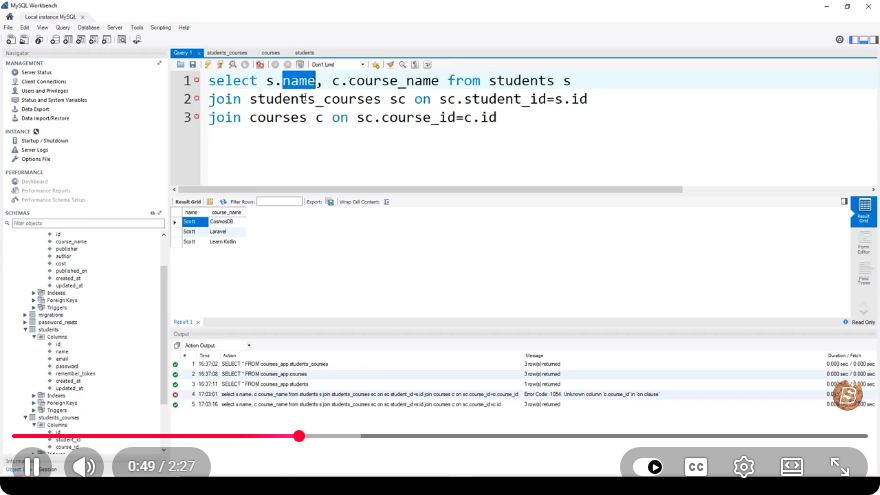
Understanding MySQL Joins: A Quick Guide
MySQL is a powerful relational database management system that allows users to efficiently store and retrieve data. One of the most important features of MySQL is the ability to perform joins. Joins allow you to combine rows from two or more tables based on related columns, making it easier to query related data. In this blog post, we will explore the various types of joins in MySQL and how to use them effectively.
What are Joins?
In relational databases, data is organized into tables. Each table typically represents a different entity, and relationships between these entities are often established through foreign keys. Joins enable you to connect these tables and retrieve meaningful information from multiple sources in a single query.
Types of Joins in MySQL
MySQL supports several types of joins, each serving a different purpose. The most common types include:
- INNER JOIN
- LEFT JOIN (or LEFT OUTER JOIN)
- RIGHT JOIN (or RIGHT OUTER JOIN)
- FULL JOIN (or FULL OUTER JOIN)
- CROSS JOIN
Let’s take a closer look at each type.
INNER JOIN
An INNER JOIN returns only the rows that have matching values in both tables. It is the most common type of join.
Example
Consider two tables: customers and orders.
CREATE TABLE customers (
    id INT AUTO_INCREMENT PRIMARY KEY,
    name VARCHAR(100)
);

CREATE TABLE orders (
    id INT AUTO_INCREMENT PRIMARY KEY,
    customer_id INT,
    order_date DATE,
    FOREIGN KEY (customer_id) REFERENCES customers(id)
);
To get a list of customers and their orders, you would use:
SELECT customers.name, orders.order_date
FROM customers
INNER JOIN orders ON customers.id = orders.customer_id;
LEFT JOIN
A LEFT JOIN returns all the rows from the left table and the matched rows from the right table. If there is no match, NULL values will be returned for columns from the right table.
Example
Continuing with the previous example, if you want to see all customers, even those without orders:
SELECT customers.name, orders.order_date
FROM customers
LEFT JOIN orders ON customers.id = orders.customer_id;
RIGHT JOIN
A RIGHT JOIN is similar to a LEFT JOIN but returns all the rows from the right table and matched rows from the left table. If there is no match, NULL will be returned for columns from the left table.
Example
To see all orders, including those without a matching customer:
SELECT customers.name, orders.order_date
FROM customers
RIGHT JOIN orders ON customers.id = orders.customer_id;
FULL JOIN
A FULL JOIN combines the results of both LEFT and RIGHT joins. It returns all rows from both tables, with NULLs in places where there is no match.
Example
MySQL does not directly support FULL OUTER JOIN, but you can simulate it using UNION:
SELECT customers.name, orders.order_date
FROM customers
LEFT JOIN orders ON customers.id = orders.customer_id
UNION
SELECT customers.name, orders.order_date
FROM customers
RIGHT JOIN orders ON customers.id = orders.customer_id;
CROSS JOIN
A CROSS JOIN returns the Cartesian product of the two tables. This means that it will return all possible combinations of rows from both tables.
Example
To get all combinations of customers and orders:
SELECT customers.name, orders.order_date
FROM customers
CROSS JOIN orders;
Conclusion
Joins are a fundamental aspect of working with relational databases in MySQL. Understanding how to use INNER, LEFT, RIGHT, FULL, and CROSS joins allows you to retrieve and manipulate data efficiently across multiple tables. As you build more complex queries, mastering these join types will significantly enhance your database querying skills.
For further learning, consider practicing with sample databases and experimenting with different types of joins to see how they interact with your data. Happy querying!
Connect with SkillBakery Studios
Explore more tutorials, tools, and resources:
Posted by SkillBakery Studios


 Hello, my name is Jack Sparrow. I'm a 50 year old self-employed Pirate from the Caribbean.
No comments:
Post a Comment