
Web Developers : 7-Refresh Data Using Apollo Query Component: Manual and Timed Interval Refetching
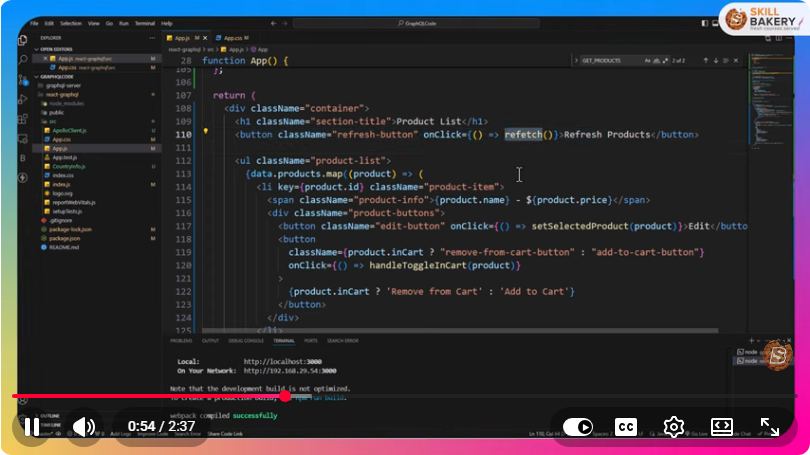
Web Developers: Refresh Data Using Apollo Query Component
In the realm of modern web development, efficiently managing data fetching is crucial for creating dynamic and responsive applications. Apollo Client, a popular state management library for JavaScript applications, provides robust tools to handle data from GraphQL APIs. In this blog post, we’ll explore how to use the Apollo Query component to refresh data, focusing on both manual and timed interval refetching techniques.
What is Apollo Client?
Apollo Client is a comprehensive state management library that enables developers to manage both local and remote data using GraphQL. It simplifies the process of fetching, caching, and updating data in your applications, making it a go-to solution for many developers.
Setting Up Apollo Client
Before diving into data refetching, ensure that you have Apollo Client set up in your project. If you haven’t already done so, follow these steps:
Install Apollo Client
You can add Apollo Client to your project using npm or yarn. Open your terminal and run:
npm install @apollo/client graphql
Initialize Apollo Client
Next, initialize the Apollo Client with your GraphQL endpoint:
import { ApolloClient, InMemoryCache } from '@apollo/client';

const client = new ApolloClient({
  uri: 'https://your-graphql-endpoint.com/graphql',
  cache: new InMemoryCache(),
});
Wrap Your Application with ApolloProvider
Ensure that your React application is wrapped with the ApolloProvider to make the client accessible throughout your component tree:
import React from 'react';
import ReactDOM from 'react-dom';
import { ApolloProvider } from '@apollo/client';
import App from './App';

ReactDOM.render(
  <ApolloProvider client={client}>
    <App />
  </ApolloProvider>,
  document.getElementById('root')
);
Using Apollo Query Component
The Apollo Query component allows you to fetch data easily. Here’s how to set it up:
Basic Query Example
import { useQuery, gql } from '@apollo/client';

const GET_DATA = gql`
  query GetData {
    data {
      id
      name
    }
  }
`;

const DataComponent = () => {
  const { loading, error, data, refetch } = useQuery(GET_DATA);

  if (loading) return <p>Loading...</p>;
  if (error) return <p>Error: {error.message}</p>;

  return (
    <div>
      <h1>Data</h1>
      <ul>
        {data.data.map(item => (
          <li key={item.id}>{item.name}</li>
        ))}
      </ul>
      <button onClick={() => refetch()}>Refresh Data</button>
    </div>
  );
};
In this snippet, we define a GraphQL query GET_DATA and use it within the DataComponent. The refetch function provided by useQuery allows manual data refreshing.
Manual Data Refetching
As demonstrated in the example above, you can easily refresh your data by calling the refetch function. This method is particularly useful when you want to refresh data in response to user actions, such as clicking a button.
Example: Manual Refresh Button
In our previous example, we added a button that users can click to refresh the data. This approach is straightforward and effective for user-initiated updates.
Timed Interval Refetching
In some cases, you may want to automatically refresh data at regular intervals, such as updating a dashboard. Apollo Client makes this easy with the pollInterval option.
Using pollInterval
You can specify a pollInterval when using the useQuery hook to automatically refetch data at set intervals (in milliseconds):
const { loading, error, data } = useQuery(GET_DATA, {
  pollInterval: 5000, // Refetch every 5 seconds
});
In this example, the query will automatically refetch every 5 seconds, ensuring that the displayed data stays up-to-date.
Example: Automatic Data Refresh
const DataComponent = () => {
  const { loading, error, data } = useQuery(GET_DATA, {
    pollInterval: 5000, // Refetch every 5 seconds
  });

  if (loading) return <p>Loading...</p>;
  if (error) return <p>Error: {error.message}</p>;

  return (
    <div>
      <h1>Data</h1>
      <ul>
        {data.data.map(item => (
          <li key={item.id}>{item.name}</li>
        ))}
      </ul>
    </div>
  );
};
In this updated DataComponent, the data will refresh automatically every 5 seconds, providing users with the latest information without needing to click a button.
Conclusion
Apollo Client provides powerful capabilities for managing data in your applications, allowing for both manual and timed interval refetching. By implementing the refetch function and pollInterval option, you can create dynamic, responsive user interfaces that keep data up-to-date effortlessly.
Experiment with these techniques in your projects, and leverage the full potential of Apollo Client to enhance your web applications. Happy coding!
Connect with SkillBakery Studios
Explore more tutorials, tools, and resources:
Posted by SkillBakery Studios


 Hello, my name is Jack Sparrow. I'm a 50 year old self-employed Pirate from the Caribbean.
No comments:
Post a Comment