
Web Development - HTML5 Differences - Comapring HTML 5 with older versions
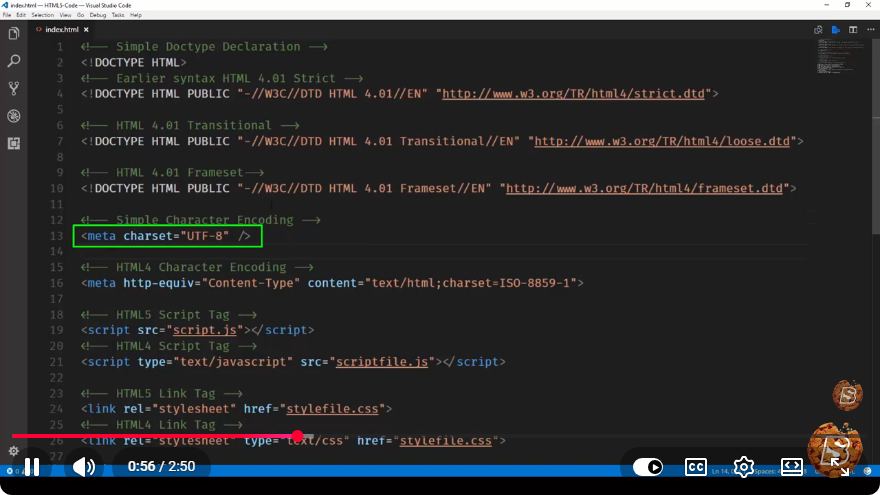
Understanding HTML5: Key Differences from Older Versions
Web development continuously evolves, and with it, the standards that dictate how we build websites. One of the most significant advancements in web technology is HTML5, which introduced a myriad of new features and improvements over its predecessors. In this blog post, we'll explore the key differences between HTML5 and older versions of HTML, highlighting the enhancements that make web development more efficient and powerful.
What is HTML?
HTML, or HyperText Markup Language, is the standard markup language used to create web pages. Since its inception, HTML has gone through several iterations, each bringing new features and improvements. The most notable versions are HTML 4.01 and XHTML 1.0, which laid the groundwork for the current standard: HTML5.
Major Differences between HTML5 and Older Versions
1. New Semantic Elements
One of the most significant changes in HTML5 is the introduction of semantic elements. These elements provide meaning to the structure of web pages, making it easier for browsers, search engines, and developers to interpret the content. Key semantic elements introduced in HTML5 include:
<header>: Defines a header for a document or section.<footer>: Represents a footer for a document or section.<article>: Specifies independent, self-contained content.<section>: Defines sections in a document.<nav>: Indicates navigation links.
Example:
<article>
  <header>
    <h1>Understanding HTML5</h1>
  </header>
  <section>
    <p>HTML5 introduces new semantic elements that improve content structure.</p>
  </section>
  <footer>
    <p>Author: John Doe</p>
  </footer>
</article>
2. Multimedia Support
HTML5 places a strong emphasis on multimedia, providing native support for audio and video without the need for third-party plugins like Flash. The <audio> and <video> elements allow for straightforward embedding of media.
Example:
<video controls>
  <source src="video.mp4" type="video/mp4">
  Your browser does not support the video tag.
</video>

<audio controls>
  <source src="audio.mp3" type="audio/mpeg">
  Your browser does not support the audio tag.
</audio>
3. Improved Form Elements
HTML5 enhances form handling with new input types and attributes that improve usability and accessibility. New input types include:
date: For date input.email: Validates email addresses.url: Validates web addresses.range: Creates a slider control.
Example:
<form>
  <label for="email">Email:</label>
  <input type="email" id="email" name="email" required>

  <label for="date">Select Date:</label>
  <input type="date" id="date" name="date">

  <label for="volume">Volume:</label>
  <input type="range" id="volume" name="volume" min="0" max="100">

  <input type="submit" value="Submit">
</form>
4. Canvas Element
HTML5 introduces the <canvas> element, which allows for dynamic, scriptable rendering of 2D shapes and images. This is particularly useful for games, interactive graphics, and data visualization.
Example:
<canvas id="myCanvas" width="200" height="100" style="border:1px solid #000000;"></canvas>
<script>
  var canvas = document.getElementById('myCanvas');
  var ctx = canvas.getContext('2d');
  ctx.fillStyle = "#FF0000";
  ctx.fillRect(0, 0, 150, 75);
</script>
5. Local Storage
HTML5 introduces the Web Storage API, which includes local storage and session storage. This allows developers to store data on the client-side, providing a simple and efficient way to save user preferences, application state, and more.
Example:
// Store data
localStorage.setItem('username', 'JohnDoe');

// Retrieve data
var username = localStorage.getItem('username');
console.log(username); // Output: JohnDoe
Conclusion
HTML5 represents a significant leap forward in web development, providing new tools and capabilities that enhance both the developer experience and the end-user experience. From new semantic elements to multimedia support and improved form handling, HTML5 offers a more robust foundational framework for building modern web applications.
As web standards continue to evolve, understanding these differences is vital for developers looking to create efficient, accessible, and engaging web experiences. Embrace HTML5 and leverage its capabilities to take your web development skills to the next level!
Connect with SkillBakery Studios
Explore more tutorials, tools, and resources:
Posted by SkillBakery Studios


 Hello, my name is Jack Sparrow. I'm a 50 year old self-employed Pirate from the Caribbean.
No comments:
Post a Comment