
10-Uploading Training Data Files to OpenAI for Fine-Tuning AI Models
How to Upload Training Data Files to OpenAI for Fine-Tuning AI Models
Fine-tuning AI models can significantly enhance their performance and tailor them to specific tasks. OpenAI provides a robust platform for this purpose, allowing developers and researchers to utilize their models effectively. In this tutorial, we will explore how to upload training data files to OpenAI for fine-tuning, ensuring you have a well-structured dataset and optimize your model for the best results.
Step 1: Understanding the Importance of Fine-Tuning
Fine-tuning is the process of taking a pre-trained AI model and training it further on a specific dataset. This allows the model to adapt to particular tasks, domains, or styles that may not have been covered during its initial training. The benefits of fine-tuning include:
- Improved accuracy for specific tasks
- Enhanced performance in niche areas
- Customization to meet your unique requirements
Step 2: Preparing Your Training Data
Before uploading your data to OpenAI, it's crucial to prepare it properly. Here are the key considerations for structuring your dataset:
Dataset Format
OpenAI accepts training data in JSONL (JSON Lines) format. Each line in the file represents a separate training example. Here is a basic structure you should follow:
{"prompt": "Provide a summary of the article.", "completion": "The article discusses..."}
{"prompt": "Translate 'Hello' to Spanish.", "completion": "Hola."}
Data Quality
Ensure your dataset is of high quality. This means it should be:
- Relevant to the task you want to fine-tune your model for.
- Diverse enough to cover various scenarios.
- Clean and free from errors, such as typos or incorrect information.
Size of the Dataset
While there is no strict rule for the size of your dataset, having more examples generally leads to better fine-tuning results. However, ensure the data remains relevant and useful.
Step 3: Using the OpenAI API for Uploading Data
To upload your training data, you will need to interact with the OpenAI API. Here’s how to do it step-by-step.
1. Set Up Your OpenAI Account
If you haven’t already, create an account on the OpenAI platform and obtain your API key. This key will be necessary for authentication when making API calls.
2. Install OpenAI Python Package
Make sure you have the OpenAI Python package installed. If you haven't installed it yet, you can do so using pip:
pip install openai
3. Uploading Your Training Data
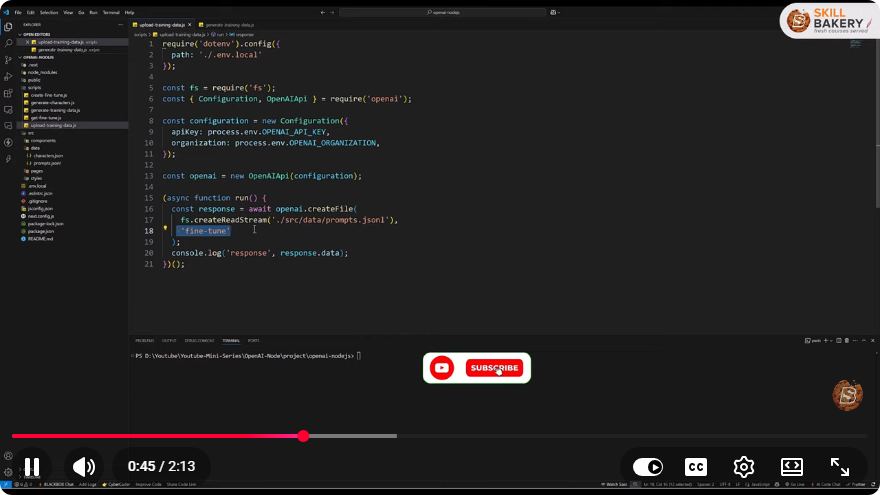
You can upload your training file using the following Python code snippet:
import openai

# Authenticate with your OpenAI API key
openai.api_key = 'your-api-key'

# Upload your training data
response = openai.File.create(
    file=open("path/to/your/training_data.jsonl"),
    purpose='fine-tune'
)

print(response)
Replace "path/to/your/training_data.jsonl" with the actual path to your dataset file. The purpose parameter should be set to 'fine-tune' to indicate that you intend to fine-tune a model with this data.
Step 4: Fine-Tuning Your Model
Once your data is uploaded, you can create a fine-tuning job using the following code:
fine_tune_response = openai.FineTune.create(
    training_file=response['id'],
    model='curie'  # or another model of your choice
)

print(fine_tune_response)
Make sure to specify the model you want to fine-tune (e.g., curie, davinci, etc.). The training_file parameter should be set to the ID of the file you uploaded in the previous step.
Step 5: Monitoring the Fine-Tuning Process
After initiating the fine-tuning process, you can monitor its progress by checking the status of your fine-tuning job:
status_response = openai.FineTune.retrieve(id=fine_tune_response['id'])
print(status_response)
This will provide you with details about the fine-tuning job, including its current state and any potential errors.
Conclusion
Fine-tuning AI models with OpenAI is a powerful way to enhance their functionality for specific tasks. By following this guide, you can structure your dataset correctly, upload it through the OpenAI API, and successfully fine-tune your models for optimized performance. With the right training data and fine-tuning process, you can unlock the full potential of OpenAI's capabilities. Happy fine-tuning!
Connect with SkillBakery Studios
Explore more tutorials, tools, and resources:
Posted by SkillBakery Studios


 Hello, my name is Jack Sparrow. I'm a 50 year old self-employed Pirate from the Caribbean.
No comments:
Post a Comment