
23. Azure Active Directory B2C: An Introduction to Identity and Access Management
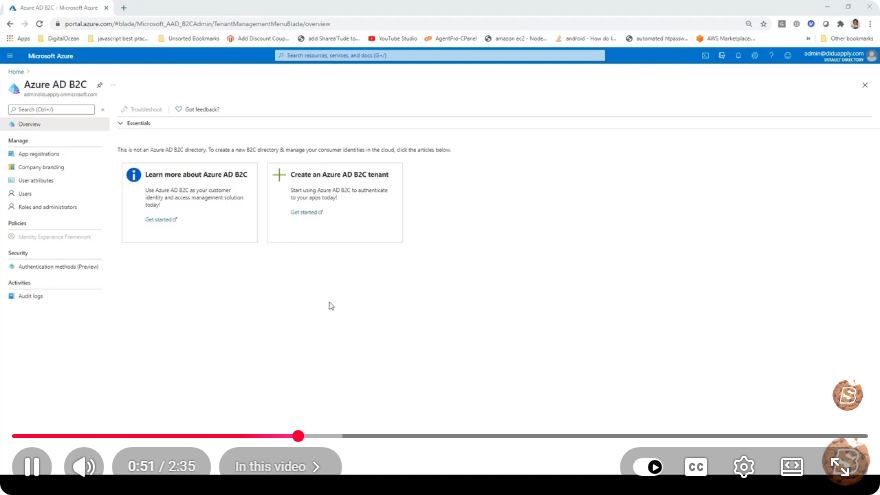
Azure Active Directory B2C: An Introduction to Identity and Access Management
In today’s digital landscape, managing user identities and access rights is crucial for businesses and developers alike. Azure Active Directory B2C (Business to Consumer) provides a comprehensive solution for identity and access management (IAM) that enables organizations to secure their applications while offering a seamless user experience. This blog post will introduce you to Azure AD B2C, its key features, and how it can benefit your applications.
What is Azure Active Directory B2C?
Azure Active Directory B2C is a cloud-based identity management service that allows businesses to manage customer identities and provide authentication for their applications. It allows users to sign up, sign in, and manage their profiles while ensuring that their data remains secure. Azure AD B2C is built on the Microsoft Azure platform, providing scalability, reliability, and security.
Key Features of Azure AD B2C
Customizable User Journeys: Azure AD B2C allows you to create tailored user experiences for sign-up, sign-in, profile editing, and password recovery. You can customize user journeys using the built-in policy editor or by creating your own custom policies.
Social Identity Providers: Users can log in using their existing social media accounts, such as Facebook, Google, and Microsoft, reducing friction during the authentication process. This feature can enhance user adoption and satisfaction.
Multi-Factor Authentication (MFA): For added security, Azure AD B2C supports multi-factor authentication. This means that users can be required to provide additional verification, such as a text message code or a phone call, to ensure that their accounts are secure.
Single Sign-On (SSO): Users can enjoy a unified sign-in experience across multiple applications. Once logged in, they can access all applications that are connected to Azure AD B2C without needing to sign in again.
Scalability: Being a cloud service, Azure AD B2C can scale automatically to support a large number of users, making it an excellent choice for applications expecting rapid growth.
Compliance and Security: Azure AD B2C adheres to global compliance standards, ensuring that user data is handled securely. With built-in security features, it helps organizations meet regulatory requirements.
Getting Started with Azure AD B2C
To get started with Azure AD B2C, follow these steps:
Step 1: Create an Azure AD B2C Tenant
- Sign in to the Azure portal.
- In the left-hand menu, click on "Create a resource."
- Search for "Azure Active Directory B2C" and select it.
- Click on "Create" and fill in the required information, such as the organization name and initial domain name.
- Review the terms and conditions, then click "Create."
Step 2: Register an Application
- After creating your B2C tenant, navigate to the Azure AD B2C blade.
- Click on "App registrations" and select "New registration."
- Specify a name for your application and set the redirect URI.
- Click "Register" to save your application settings.
Step 3: Configure User Flows
- In the Azure AD B2C blade, select "User flows" under the "Policies" section.
- Click on "New user flow" and choose the type of flow you want to create (e.g., sign-up and sign-in).
- Customize your user flow settings according to your application’s requirements.
- Click "Create" to finalize the user flow.
Step 4: Integrate with Your Application
To integrate Azure AD B2C with your application, you can use the provided SDKs and libraries. Below is an example for a web application using JavaScript.
const msalConfig = {
    auth: {
        clientId: "YOUR_CLIENT_ID",
        authority: "https://YOUR_TENANT_NAME.b2clogin.com/YOUR_TENANT_NAME.onmicrosoft.com/B2C_1A_SIGNUP_SIGNIN",
        redirectUri: "YOUR_REDIRECT_URI",
    }
};

const msalInstance = new Msal.UserAgentApplication(msalConfig);

// Sign in function
function signIn() {
    msalInstance.loginPopup()
        .then(response => {
            console.log("Logged in successfully:", response);
        })
        .catch(error => {
            console.error("Login failed:", error);
        });
}
Conclusion
Azure Active Directory B2C simplifies identity and access management, providing a seamless experience for both developers and users. With its robust features such as customizable user journeys, multi-factor authentication, and social identity integration, Azure AD B2C is becoming a go-to solution for organizations looking to secure their applications.
Whether you’re building a new application or looking to enhance the security of an existing one, Azure AD B2C can provide the tools necessary for effective identity management. Start exploring Azure AD B2C today to give your users a secure and efficient authentication experience!
Connect with SkillBakery Studios
Explore more tutorials, tools, and resources:
Posted by SkillBakery Studios


 Hello, my name is Jack Sparrow. I'm a 50 year old self-employed Pirate from the Caribbean.
No comments:
Post a Comment