
Data Structures in C# Exploring Sequential Search 2 minutes
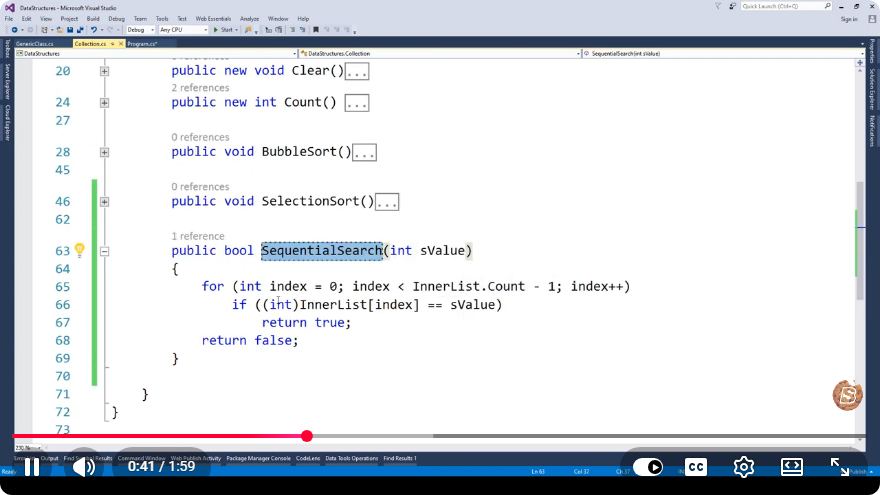
Data Structures in C#: Exploring Sequential Search
In the realm of computer science, data structures are fundamental components that help organize and manage data efficiently. Among the various data structures, the sequential search algorithm is a simple yet crucial concept. In this blog post, we will explore the implementation of sequential search in C#, discussing its functionality, use cases, and performance considerations.
What is Sequential Search?
Sequential search, also known as linear search, is a straightforward searching algorithm used to find a specific value in a list. The algorithm works by checking each element in the list one by one until it finds the target value or reaches the end of the list. This makes it easy to implement but can be inefficient for large datasets.
Key Characteristics of Sequential Search
- Simplicity: The algorithm is simple to understand and implement.
- Unsorted data: It works on both sorted and unsorted data.
- Time Complexity: The average and worst-case time complexity is O(n), where n is the number of elements in the list.
When to Use Sequential Search
Sequential search is ideal for smaller datasets or when the data is unsorted. It is also useful when the cost of sorting the data outweighs the benefits of faster search algorithms. Given its simplicity, it is often used in educational contexts to introduce searching techniques.
Implementing Sequential Search in C#
Let’s dive into the implementation of the sequential search algorithm in C#. Below is a simple example demonstrating how to perform a sequential search in an array.
Code Example
using System;

class SequentialSearch
{
    static void Main(string[] args)
    {
        int[] numbers = { 5, 3, 8, 4, 2 };
        int target = 4;

        int result = Search(numbers, target);

        if (result != -1)
        {
            Console.WriteLine($"Element found at index: {result}");
        }
        else
        {
            Console.WriteLine("Element not found.");
        }
    }

    static int Search(int[] array, int target)
    {
        for (int i = 0; i < array.Length; i++)
        {
            if (array[i] == target)
            {
                return i; // Return the index of the found element
            }
        }
        return -1; // Return -1 if the element is not found
    }
}
Explanation of the Code
Array Initialization: We start by initializing an integer array called
numberswith some values and setting thetargetvariable to the value we wish to find.Search Method: The
Searchmethod takes an array and a target value as input. It iterates through the array using a for loop. If it finds the target value, it returns the index of that value. If the loop completes without finding the target, it returns -1.Output: The main method calls the
Searchmethod and prints the index of the found element or a message indicating the element was not found.
Performance Considerations
While sequential search is easy to implement, it is not the most efficient algorithm for larger datasets. As the size of the dataset increases, the time it takes to find an element will also increase linearly. Therefore, for larger datasets, consider more advanced searching algorithms such as binary search or hash-based searches, which offer better performance.
Conclusion
Sequential search is a vital concept in data structures and algorithms. Its simplicity makes it an excellent starting point for understanding searching techniques in C#. By grasping sequential search, you will be better equipped to tackle more complex algorithms and data structures in your programming journey.
Feel free to experiment with the code provided, and don’t hesitate to extend it to explore additional features, such as searching for multiple occurrences or implementing it with different data types!
Connect with SkillBakery Studios
Explore more tutorials, tools, and resources:
Posted by SkillBakery Studios


 Hello, my name is Jack Sparrow. I'm a 50 year old self-employed Pirate from the Caribbean.
No comments:
Post a Comment