
JavaScript - Learn how to remove Falsy values from Array
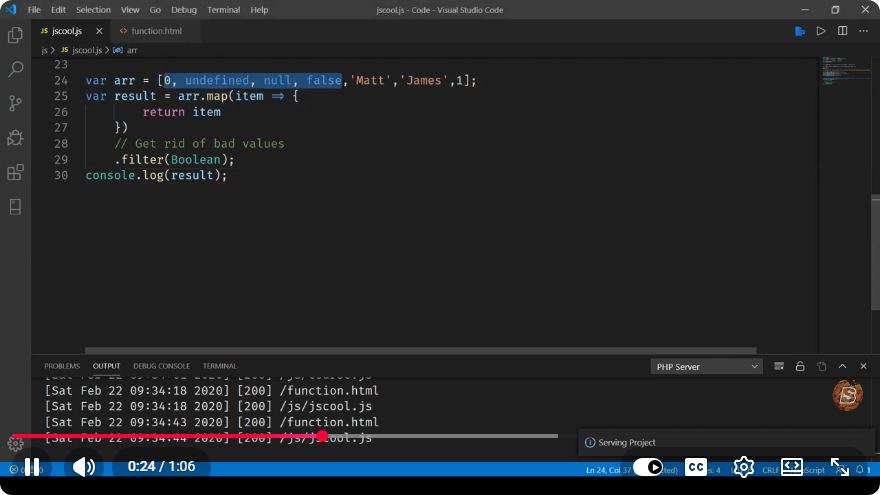
Removing Falsy Values from an Array in JavaScript
JavaScript is a powerful programming language that allows developers to manipulate arrays efficiently. One common task you might encounter is the need to remove falsy values from an array. Falsy values in JavaScript include false, 0, "" (empty string), null, undefined, and NaN. In this blog post, we will explore different methods to achieve this in a concise and effective manner.
What are Falsy Values?
In JavaScript, a value is considered "falsy" if it translates to false when evaluated in a boolean context. The following values are falsy:
false0""(empty string)nullundefinedNaN
Understanding these values is crucial when filtering arrays, as we want to retain only the "truthy" values (values that are not falsy).
Why Remove Falsy Values?
Removing falsy values from an array can help in:
- Cleaning up data: Ensuring that only valid, meaningful data is processed.
- Preventing errors: Avoiding unexpected behavior in subsequent operations that depend on the array.
Methods to Remove Falsy Values
1. Using the filter() Method
The simplest and most effective way to remove falsy values from an array is by using the filter() method. This method creates a new array with all elements that pass the test implemented by the provided function.
Here’s how to do it:
const arrayWithFalsy = [0, 1, false, 2, '', 3, null, 4, undefined, 5, NaN];

const arrayWithoutFalsy = arrayWithFalsy.filter(Boolean);

console.log(arrayWithoutFalsy); // Output: [1, 2, 3, 4, 5]
Explanation:
Booleanis a built-in function in JavaScript that converts values to their boolean equivalents. When used as a callback forfilter(), it effectively removes all falsy values from the array.
2. Using a Traditional Loop
If you prefer a more traditional approach, you can also use a for loop to iterate through the array and filter out falsy values manually.
const arrayWithFalsy = [0, 1, false, 2, '', 3, null, 4, undefined, 5, NaN];
const arrayWithoutFalsy = [];

for (let i = 0; i < arrayWithFalsy.length; i++) {
    if (arrayWithFalsy[i]) {
        arrayWithoutFalsy.push(arrayWithFalsy[i]);
    }
}

console.log(arrayWithoutFalsy); // Output: [1, 2, 3, 4, 5]
Explanation:
- We create an empty array called
arrayWithoutFalsy. - We loop through each element of
arrayWithFalsy, checking if it is truthy. - If the value is truthy, we push it to
arrayWithoutFalsy.
3. Using reduce()
Another elegant method to filter out falsy values is using the reduce() method. This method executes a reducer function on each element of the array, resulting in a single output value.
const arrayWithFalsy = [0, 1, false, 2, '', 3, null, 4, undefined, 5, NaN];

const arrayWithoutFalsy = arrayWithFalsy.reduce((accumulator, currentValue) => {
    if (currentValue) {
        accumulator.push(currentValue);
    }
    return accumulator;
}, []);

console.log(arrayWithoutFalsy); // Output: [1, 2, 3, 4, 5]
Explanation:
- We define an accumulator that starts as an empty array.
- For each element in
arrayWithFalsy, we check if it is truthy and, if so, push it into the accumulator. - Finally, we return the accumulator as the new filtered array.
Conclusion
Removing falsy values from an array in JavaScript can be achieved through multiple methods, including the filter() method, traditional loops, and the reduce() method. Each approach has its own advantages, and you can choose the one that best fits your coding style and project requirements.
By understanding how to filter out falsy values, you can ensure that your arrays contain only meaningful data, leading to cleaner and more efficient code. Happy coding!
Connect with SkillBakery Studios
Explore more tutorials, tools, and resources:
Posted by SkillBakery Studios


 Hello, my name is Jack Sparrow. I'm a 50 year old self-employed Pirate from the Caribbean.
No comments:
Post a Comment