
JavaScript - Passing variable number of arguments to a method
JavaScript: Passing a Variable Number of Arguments to a Method
In this tutorial, we will explore how to pass a variable number of arguments to a method in JavaScript. This feature is particularly useful when the number of arguments you need to pass is not fixed. JavaScript provides several ways to accomplish this, and we will discuss the most common techniques.
Understanding Function Arguments
In JavaScript, functions can accept parameters, which are placeholders for the values you pass to the function when you call it. By default, JavaScript functions can accept any number of arguments, even if you define fewer parameters in the function declaration.
Example of Basic Function Definition
function greet(name) {
    console.log(`Hello, ${name}!`);
}

greet('Alice'); // Output: Hello, Alice!
In the example above, the greet function is designed to take one argument. However, JavaScript allows you to call it with additional arguments without any errors.
Calling a Function with Extra Arguments
greet('Alice', 'Bob'); // Output: Hello, Alice!
When calling the greet function with two arguments, JavaScript ignores the extra argument. This flexibility can be useful, but if you need to handle a variable number of arguments effectively, there are better methods.
Method 1: Using the arguments Object
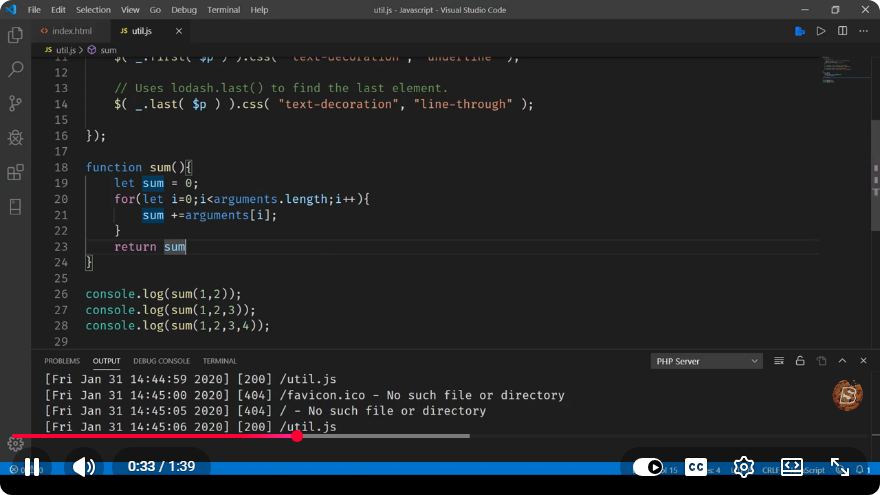
JavaScript provides an arguments object that contains all the arguments passed to a function. This object is array-like but does not have array methods. Here's how you can use it:
Example
function sum() {
    let total = 0;
    for (let i = 0; i < arguments.length; i++) {
        total += arguments[i];
    }
    return total;
}

console.log(sum(1, 2, 3)); // Output: 6
console.log(sum(10, 20, 30, 40)); // Output: 100
In this example, the sum function calculates the total of all arguments passed to it. The arguments object allows us to loop through all provided arguments.
Method 2: Using the Rest Parameter Syntax
The rest parameter syntax, introduced in ES6, provides a cleaner and more modern way to handle a variable number of arguments. By using the rest parameter, you can collect all remaining arguments into an array.
Syntax
function funcName(...rest) {
    // Your logic here
}
Example
function multiply(...numbers) {
    return numbers.reduce((acc, num) => acc * num, 1);
}

console.log(multiply(2, 3)); // Output: 6
console.log(multiply(1, 2, 3, 4)); // Output: 24
In the multiply function, we use the rest parameter ...numbers to gather all arguments into an array. The reduce method is then used to multiply all the elements together.
Method 3: Using Array Methods
Whenever you collect arguments into an array, you can leverage the powerful array methods available in JavaScript. This allows for more complex operations on your arguments.
Example
function concatenate(...strings) {
    return strings.join(' ');
}

console.log(concatenate('Hello', 'world', '!')); // Output: Hello world !
Here, the concatenate function takes any number of string arguments and joins them into a single string with spaces in between.
Conclusion
Passing a variable number of arguments to a method in JavaScript can be easily achieved using the arguments object or the more modern rest parameter syntax. Understanding these methods allows for more flexible and dynamic function definitions, making your JavaScript code cleaner and more efficient.
Feel free to experiment with these techniques in your JavaScript projects. Happy coding!
Connect with SkillBakery Studios
Explore more tutorials, tools, and resources:
Posted by SkillBakery Studios


 Hello, my name is Jack Sparrow. I'm a 50 year old self-employed Pirate from the Caribbean.
No comments:
Post a Comment