
Lecture-11: AI + Ticketing System Integration | Automate IT Support with Generative AI
Automating IT Support: Integrating Generative AI with Ticketing Systems
In today's fast-paced digital landscape, organizations are constantly seeking innovative methods to enhance their IT support operations. One of the most promising advancements is the integration of Generative AI with ticketing systems. In this blog post, we will explore how this integration can automate support workflows, improve response times, and ultimately enhance customer satisfaction.
Understanding the Role of Ticketing Systems in IT Support
Before diving into the integration of Generative AI with ticketing systems, it’s essential to understand what a ticketing system is and its significance in IT support. A ticketing system serves as a centralized platform where support requests are submitted, tracked, and managed. This system allows IT teams to efficiently handle inquiries, resolve issues, and maintain a record of interactions with users.
Key Functions of IT Ticketing Systems
- Issue Tracking: Keeps a detailed log of all reported issues.
- Categorization: Organizes tickets by type, priority, and department.
- Collaboration: Facilitates communication between support agents and users.
- Reporting: Generates insights on performance metrics and ticket resolution times.
The Power of Generative AI in IT Support
Generative AI refers to algorithms that can generate new content based on existing data. In the context of IT support, it can analyze support tickets and provide intelligent responses or solutions. This capability can drastically reduce the workload on IT teams and improve the overall efficiency of the support process.
Benefits of Integrating Generative AI with Ticketing Systems
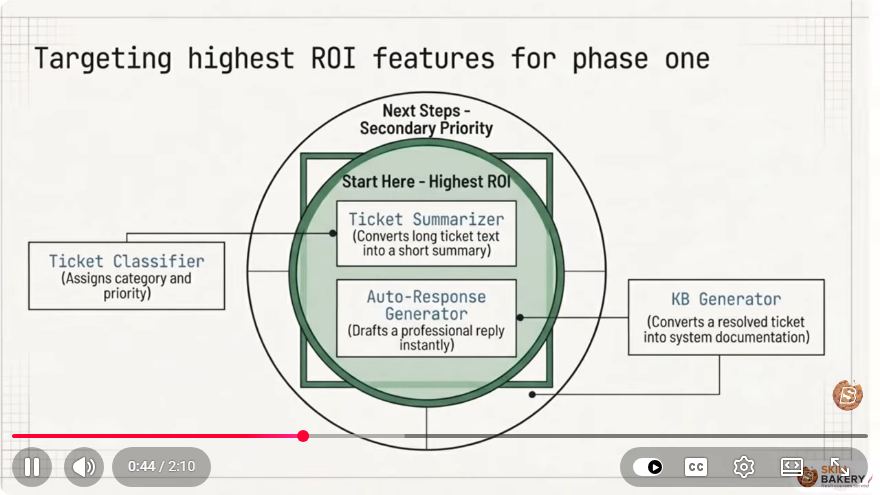
Intelligent Ticket Analysis: AI can analyze incoming support tickets to identify patterns and categorize issues automatically. This reduces the time spent on manual categorization.
Automated Solutions: By leveraging historical data, Generative AI can recommend solutions for common issues, allowing support teams to resolve tickets faster.
Enhanced Response Times: With AI handling initial assessments, support teams can focus on more complex problems, ultimately improving response times.
Continuous Learning: Generative AI systems can learn from new data, continuously improving their accuracy and efficiency over time.
Steps to Integrate Generative AI into Your Ticketing System
Integrating Generative AI into your existing ticketing system can seem daunting, but the process can be broken down into several manageable steps.
Step 1: Define Your Objectives
Before you start the integration process, it’s crucial to define what you hope to achieve. Common objectives include:
- Reducing ticket resolution times
- Increasing customer satisfaction
- Enhancing the efficiency of support agents
Step 2: Choose the Right AI Tool
Select a Generative AI tool that suits your needs and integrates well with your ticketing system. Popular options include:
- OpenAI’s GPT-4: Known for its natural language processing capabilities.
- IBM Watson: Offers robust AI solutions tailored for customer service.
- Zendesk’s AI Features: Built-in tools for support ticket analysis and automation.
Step 3: Data Preparation
For AI to function effectively, it requires quality data. Prepare your historical support ticket data by:
- Cleaning up existing ticket data.
- Standardizing categories and tags.
- Ensuring that the data is representative of current trends and issues.
Step 4: Implement AI Algorithms
Once you have selected your AI tool and prepared the data, you can implement the AI algorithms. This may involve:
from generative_ai import AIModel

# Load your AI model
model = AIModel.load('path_to_your_model')

# Analyze a sample ticket
ticket = "My internet is down, and I need help!"
response = model.analyze_ticket(ticket)

# Output recommended solutions
print(response)
Step 5: Test and Optimize
Before rolling out the integration, conduct thorough testing to ensure that the AI is accurately categorizing tickets and providing relevant solutions. Gather feedback from support agents to identify areas for improvement.
Step 6: Monitor Performance
After implementation, continuously monitor the performance of the integrated system. Key metrics to track include:
- Average resolution time
- Customer satisfaction scores
- Ticket backlog
Regularly update the AI model with new data to improve its accuracy and effectiveness.
Conclusion
Integrating Generative AI with your IT ticketing system can revolutionize your support workflows. By automating ticket analysis and solution recommendations, organizations can streamline their operations, reduce response times, and ultimately enhance customer satisfaction. As technology continues to evolve, staying ahead of the curve with AI-driven solutions is not just an option—it's a necessity for successful IT support.
For more in-depth discussions and real-world applications of AI in IT support, check out the full lecture here. Happy automating!
Connect with SkillBakery Studios
Explore more tutorials, tools, and resources:
Posted by SkillBakery Studios


 Hello, my name is Jack Sparrow. I'm a 50 year old self-employed Pirate from the Caribbean.
No comments:
Post a Comment