
NextJs - React Framework - Environment Variables

Understanding Environment Variables in Next.js
Next.js is a powerful React framework that simplifies the development of server-rendered applications. One of the critical aspects of building applications is the management of environment variables. In this blog post, we'll explore what environment variables are, how to set them up in Next.js, and some best practices to follow.
What are Environment Variables?
Environment variables are dynamic values that can affect the behavior of processes on a computer. They are commonly used to store configuration settings, such as API keys, database URLs, and other sensitive information that you do not want to hard-code into your application.
In Next.js, environment variables allow you to manage different configurations for development, testing, and production environments without changing your codebase.
Setting Up Environment Variables in Next.js
1. Create a .env File
To start using environment variables in Next.js, you need to create a .env file in the root of your project. You can create different environment files for various environments:
.env.local- For local development (ignored by Git).env.development- For development builds.env.production- For production builds
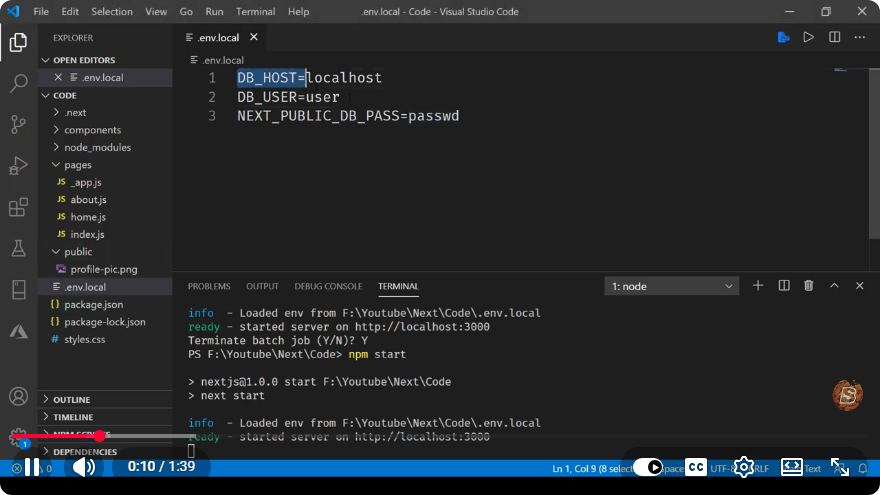
Here’s an example of a .env.local file:
NEXT_PUBLIC_API_URL=https://api.example.com
SECRET_API_KEY=mysecretapikey
2. Accessing Environment Variables
Next.js allows you to access environment variables within your application. However, only variables prefixed with NEXT_PUBLIC_ are exposed to the browser. This is a security feature to keep sensitive information hidden.
Here’s how you can access these variables in your code:
const apiUrl = process.env.NEXT_PUBLIC_API_URL;
const secretApiKey = process.env.SECRET_API_KEY; // Not accessible in the browser
3. Using Environment Variables in Components
You can use environment variables directly in your components. For example, if you want to fetch data from an API using your environment variable, you can do it as follows:
import { useEffect, useState } from 'react';

const MyComponent = () => {
  const [data, setData] = useState(null);

  useEffect(() => {
    const fetchData = async () => {
      const response = await fetch(`${process.env.NEXT_PUBLIC_API_URL}/data`);
      const result = await response.json();
      setData(result);
    };

    fetchData();
  }, []);

  return (
    <div>
      <h1>Data from API</h1>
      <pre>{JSON.stringify(data, null, 2)}</pre>
    </div>
  );
};

export default MyComponent;
Best Practices for Using Environment Variables
Keep Sensitive Information Secure: Never expose sensitive information in your client-side code. Always prefix client-accessible variables with
NEXT_PUBLIC_.Use
.env.localfor Local Development: Keep your local environment settings separate from your production settings by using.env.local, which is ignored by version control.Avoid Hard-Coding: Instead of hard-coding values directly in your application, use environment variables to maintain flexibility and security.
Document Your Variables: Create a README or a documentation file that lists all the environment variables used in your application, along with their purposes and expected values.
Conclusion
Environment variables are an essential part of developing applications in Next.js. They provide a flexible way to manage different configurations across various environments while keeping sensitive information secure. By following the guidelines and best practices mentioned in this tutorial, you can effectively manage environment variables in your Next.js projects.
For more in-depth resources, consider checking out the Next.js documentation on Environment Variables. Happy coding!
Connect with SkillBakery Studios
Explore more tutorials, tools, and resources:
Posted by SkillBakery Studios


 Hello, my name is Jack Sparrow. I'm a 50 year old self-employed Pirate from the Caribbean.
No comments:
Post a Comment