
Unleashing the Power of HTML 5: Manipulating Rows in HTML5 WebSQL Database
Unleashing the Power of HTML5: Manipulating Rows in HTML5 WebSQL Database
In the world of web development, HTML5 has brought forth a plethora of powerful APIs that elevate the capabilities of web applications. One such feature is the WebSQL database, which allows developers to store structured data on the client side. In this tutorial, we will delve into manipulating rows in an HTML5 WebSQL database, providing you with the knowledge needed to harness this feature effectively.
What is WebSQL?
WebSQL is a web API that enables the storage of data in a relational database format within the browser. Although it is deprecated and not supported in all browsers (notably, it is not supported in Firefox), it is still useful for certain applications and learning purposes. WebSQL allows developers to execute SQL queries in JavaScript, making data management straightforward.
Key Features of WebSQL
- Client-Side Storage: Data is stored on the user's device, which can lead to faster access and reduced server load.
- SQL Support: You can use familiar SQL commands (e.g., SELECT, INSERT, UPDATE, DELETE) to manipulate data.
- Transaction Handling: WebSQL supports transactions, allowing you to group multiple operations into a single, atomic unit.
Setting Up a WebSQL Database
To get started with WebSQL, you first need to create a database. Below is a simple example of how to create a database and a table:
// Open (or create) a database
var db = openDatabase('mydb', '1.0', 'Test DB', 2 * 1024 * 1024);

// Create a table if it does not already exist
db.transaction(function (tx) {
    tx.executeSql('CREATE TABLE IF NOT EXISTS LOGS (id unique, log)');
});
Explanation:
openDatabase: This function opens a database with the specified name, version, and description.CREATE TABLE: SQL command to create a new table namedLOGSwith anidand alogcolumn.
Inserting Rows into the Database
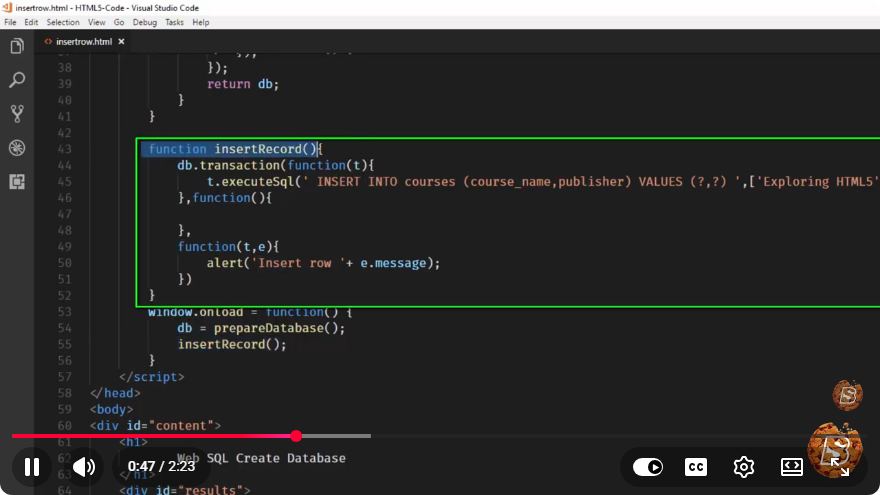
Once you have your database and table set up, you can insert rows. Here’s how to do it:
db.transaction(function (tx) {
    tx.executeSql('INSERT INTO LOGS (id, log) VALUES (?, ?)', [1, 'Log Entry 1']);
    tx.executeSql('INSERT INTO LOGS (id, log) VALUES (?, ?)', [2, 'Log Entry 2']);
});
Explanation:
- The
INSERT INTOSQL command is used to add new rows to theLOGStable. - The question marks (
?) are placeholders for values, which are provided as an array in the second argument.
Querying Rows from the Database
To retrieve data from the database, you can use the SELECT statement. Here’s an example:
db.transaction(function (tx) {
    tx.executeSql('SELECT * FROM LOGS', [], function (tx, results) {
        var len = results.rows.length, i;
        for (i = 0; i < len; i++) {
            console.log(results.rows.item(i));
        }
    });
});
Explanation:
- The
SELECTstatement fetches all rows from theLOGStable. - The callback function processes the results, iterating through the rows and logging them to the console.
Updating Rows in the Database
To modify existing rows, you'll use the UPDATE statement. Here’s how you can update a specific log entry:
db.transaction(function (tx) {
    tx.executeSql('UPDATE LOGS SET log = ? WHERE id = ?', ['Updated Log Entry', 1]);
});
Explanation:
- The
UPDATEstatement changes thelogfield of the row withidequal to1.
Deleting Rows from the Database
Deleting rows is just as simple, using the DELETE statement. Here’s an example:
db.transaction(function (tx) {
    tx.executeSql('DELETE FROM LOGS WHERE id = ?', [2]);
});
Explanation:
- The
DELETEstatement removes the row withidequal to2from theLOGStable.
Conclusion
WebSQL may not be the most modern option for client-side storage given its deprecation status, but it still provides a straightforward way to manage structured data in web applications. By manipulating rows using SQL commands, you can create robust applications that store user data locally.
As you build your skills in web development, consider exploring alternative storage options such as IndexedDB, which offer similar capabilities with broader browser support. Happy coding!
Connect with SkillBakery Studios
Explore more tutorials, tools, and resources:
Posted by SkillBakery Studios


 Hello, my name is Jack Sparrow. I'm a 50 year old self-employed Pirate from the Caribbean.
No comments:
Post a Comment