
Lecture-10: RAG for Beginners – Day 10: Build a Conversational AI with OpenAI | Full RAG Pipeline
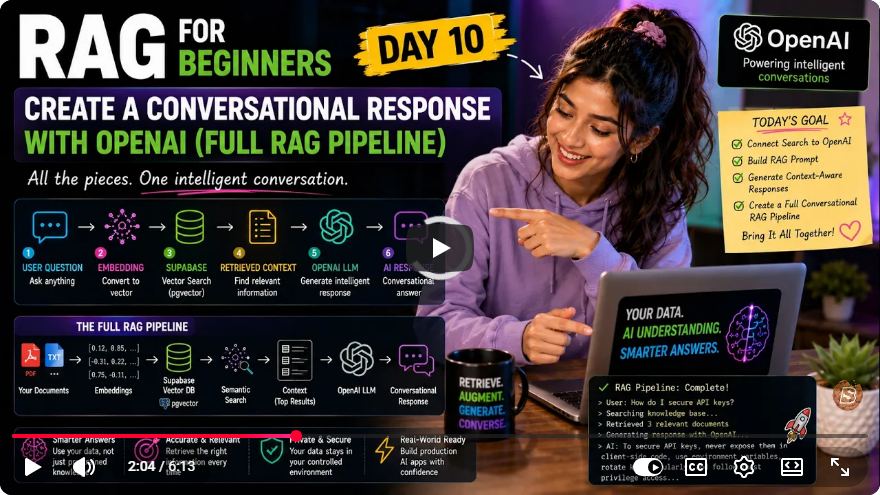
Building a Conversational AI with OpenAI: A Complete RAG Pipeline Tutorial
Welcome to Day 10 of our "RAG for Beginners" series! In this tutorial, we will walk you through the process of building a complete Retrieval-Augmented Generation (RAG) pipeline. This pipeline will take user questions, find relevant documents using semantic search, and generate conversational answers using OpenAI's powerful models.
Let's dive into the steps involved in creating this conversational AI system.
Understanding the RAG Pipeline
A RAG pipeline consists of three main components:
- Embedding User Questions: Transforming user inquiries into a format suitable for semantic search.
- Retrieving Relevant Documents: Finding the most relevant documents based on the embedded questions.
- Generating Responses: Producing a human-like answer using the retrieved information.
Step 1: Enhancing Sample Data
Before we start coding, we made a crucial update to our sample data. Initially, we were using very short and simple sentences, which caused issues with semantic search accuracy. For instance, a question like, "I want a movie with deep emotions and strong characters" didn't yield relevant results due to the lack of rich context in our records.
Update Sample Data
To improve semantic search results, we replaced the old short records with more descriptive and meaningful sentences. Here’s an example of how you can truncate existing records and insert new ones:
TRUNCATE documents RESTART IDENTITY;
This command clears the previous entries from our database, allowing us to insert new, verbose records that enhance the search experience.
Step 2: Updating the Document Matching Method
The next update involves refining the document matching function. Previously, the match documents method accepted embeddings in vector format, which caused silent failures when retrieving results.
Revised Method Implementation
We modified the method to accept text inputs and then cast them to vector format within PostgreSQL. Here’s a simplified version of this adjustment:
async function matchDocuments(queryText) {
    const embedding = await getEmbedding(queryText); // Get embedding from OpenAI
    return await database.query('SELECT * FROM documents WHERE vector_column @> $1', [embedding]);
}
This approach ensures more reliable results when integrating with Supabase, as it allows us to handle embeddings appropriately.
Step 3: Implementing the Conversational Response
Now, let’s focus on generating a conversational response based on user input. We will implement the ask question method, which encapsulates the process of embedding the question, retrieving relevant documents, and generating an answer.
Code Implementation
Here’s how the ask question function is structured:
async function askQuestion(userQuestion) {
    const queryEmbedding = await getEmbedding(userQuestion);
    const relevantDocs = await matchDocuments(queryEmbedding);

    if (relevantDocs.length > 0) {
        const context = relevantDocs.map(doc => doc.content).join(" ");
        const response = await generateResponse(context, userQuestion);
        console.log(response);
    } else {
        console.log("Sorry, I couldn't find relevant information.");
    }
}
Step 4: Generating Answers with OpenAI
The final step is to generate a response using OpenAI's model. We create a prompt that instructs OpenAI to act as a movie recommendation assistant, utilizing the context we’ve built from the retrieved documents.
Prompt Construction
Here’s how we construct the prompt for OpenAI:
async function generateResponse(context, question) {
    const prompt = `You are a helpful movie recommendation assistant. Answer the user's question using only the context provided below:\n\nContext: ${context}\nQuestion: ${question}`;

    // Call OpenAI API
    const aiResponse = await openAI.chat.completions.create({
        model: 'gpt-4-0-mini',
        messages: [{role: "user", content: prompt}],
        temperature: 0.4
    });

    return aiResponse.choices[0].message.content;
}
Running the Complete Pipeline
Now that we have everything set up, let’s execute the code to see how it performs with a user question. For instance:
askQuestion("I want a movie with deep emotions and strong characters.");
Upon running this code, you should see relevant documents retrieved along with a natural language answer generated by OpenAI based on the context.
Conclusion and Next Steps
Congratulations! You have successfully built a basic RAG pipeline that utilizes semantic search and OpenAI's conversational capabilities. In our next lesson, we will tackle how to manage longer documents by splitting them into smaller chunks to enhance performance further.
If you found this tutorial helpful, please like and subscribe for more engaging content, and visit skillbakery.com to unlock more potential in your learning journey.
Stay tuned for Day 11, where we will continue to expand our knowledge and skills in building powerful AI applications!
Connect with SkillBakery Studios
Explore more tutorials, tools, and resources:
Posted by SkillBakery Studios


 Hello, my name is Jack Sparrow. I'm a 50 year old self-employed Pirate from the Caribbean.
No comments:
Post a Comment