
Lecture-1:RAG for Beginners – What Are Embeddings?
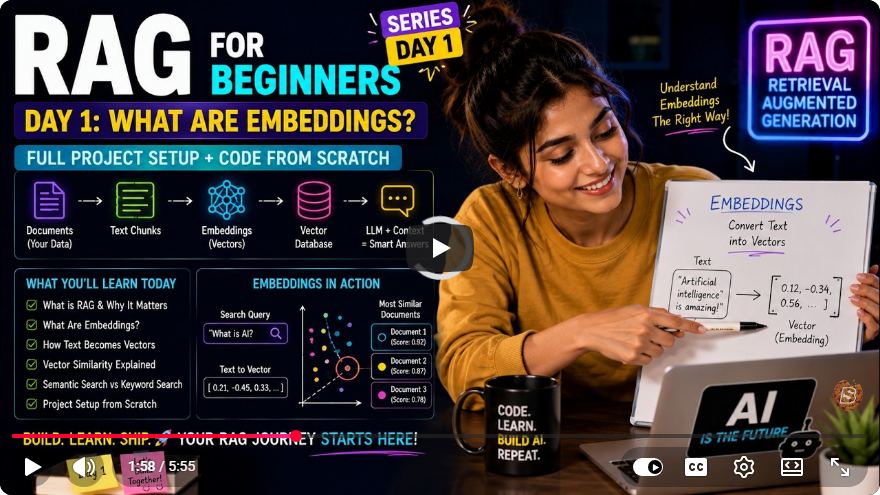
Understanding Embeddings: A Beginner's Guide to RAG
Welcome to the first installment of our series on Retrieval-Augmented Generation (RAG) for beginners! Today, we’ll dive deep into the concept of embeddings, which are crucial for understanding how machines interpret text data. In this tutorial, we will cover what embeddings are, why they matter, and how to implement them in a simple JavaScript application using OpenAI's API.
What Are Embeddings?
At its core, an embedding is a list of numbers that encapsulates the meaning of a piece of text. Since computers process information in numerical formats, we use embeddings to convert textual data into a mathematical representation. This transformation allows similar sentences to be close to each other in a multi-dimensional number space, while different sentences are distanced apart. This is fundamental to semantic search and RAG.
Setting Up Your Environment
Before we begin coding, let's set up the necessary environment for our project. We'll utilize Node.js for our JavaScript application and the OpenAI API for generating embeddings.
Step 1: Create a New Directory
First, create a new directory for your project. You can name it RAG or any preferred name. Navigate to this directory in your terminal.
mkdir RAG
cd RAG
Step 2: Initialize the Project
Next, initialize your Node.js project by creating a package.json file. This file will manage our project dependencies.
npm init -y
Step 3: Install Required Packages
We need to install the OpenAI package and dotenv for environment variable management. Run the following command:
npm install openai dotenv
Step 4: Create Configuration Files
Create a .gitignore file to exclude sensitive information and a .env file to store your OpenAI API key.
- Create .gitignore:
touch .gitignore - Create .env:
touch .env
In your .env file, add your OpenAI API key:
OPENAI_API_KEY=your_openai_api_key_here
Step 5: Create the Embeddings File
Now, let’s create a JavaScript file that will handle the embedding generation. Create a file named 01_what_are_embeddings.js.
touch 01_what_are_embeddings.js
Writing the Code
Open 01_what_are_embeddings.js and start coding the functionality for generating embeddings.
Step 1: Import Required Modules
First, we need to import the necessary modules and load environment variables.
require('dotenv').config();
const { Configuration, OpenAIApi } = require('openai');
Step 2: Configure OpenAI
Next, set up the OpenAI API configuration using your API key:
const configuration = new Configuration({
  apiKey: process.env.OPENAI_API_KEY,
});
const openai = new OpenAIApi(configuration);
Step 3: Create the Embedding Function
Now, let’s create a function that generates embeddings for a given text:
async function createEmbedding(text) {
  const response = await openai.createEmbedding({
    model: 'text-embedding-ada-002',
    input: text,
  });

  return response.data.data[0].embedding; // Return the embedding vector
}
Step 4: Main Execution
Finally, we’ll write the main execution block to input text and display the generated embeddings.
(async () => {
  const text = "What are embeddings and artificial intelligence?";

  console.log(`Creating embedding for: "${text}"`);

  const embedding = await createEmbedding(text);

  console.log("Embedding (first 8 numbers):", embedding.slice(0, 8));
})();
Running the Application
Before running your script, ensure that the OpenAI API key in your .env file is accurate. Then, execute your script using Node.js:
node 01_what_are_embeddings.js
You should see an output similar to this, displaying the first eight numbers of the generated embedding:
Creating embedding for: "What are embeddings and artificial intelligence?"
Embedding (first 8 numbers): [0.1234, -0.5678, ...]
Conclusion
Congratulations! You have successfully created a basic application to generate embeddings using OpenAI's API. Understanding embeddings is foundational for working with models in RAG, as they allow us to represent complex text data in a way machines can process.
In our next lecture, we will refine our environment variable setup and enhance the reusability of our code. If you found this tutorial helpful, please like and subscribe for more content!
Further Reading
- Explore the OpenAI API Documentation for more details on embedding models.
- Check out resources on semantic search to learn how embeddings are applied in real-world applications.
Stay tuned for our next lesson!
Connect with SkillBakery Studios
Explore more tutorials, tools, and resources:
Posted by SkillBakery Studios


 Hello, my name is Jack Sparrow. I'm a 50 year old self-employed Pirate from the Caribbean.
No comments:
Post a Comment