
Lecture-9: MCP for Beginners Course Wrap-Up | Real Projects to Build Next with MCP
Mastering the Model Context Protocol: Course Wrap-Up and Future Projects
Welcome to the culmination of our journey into the Model Context Protocol (MCP). In this final lecture, we reflect on what we have covered and explore exciting projects you can undertake next. Whether you're a beginner or someone looking to enhance your skills, this course has equipped you with a solid foundation in MCP, enabling you to build a fully functional server and client.
Progress Overview
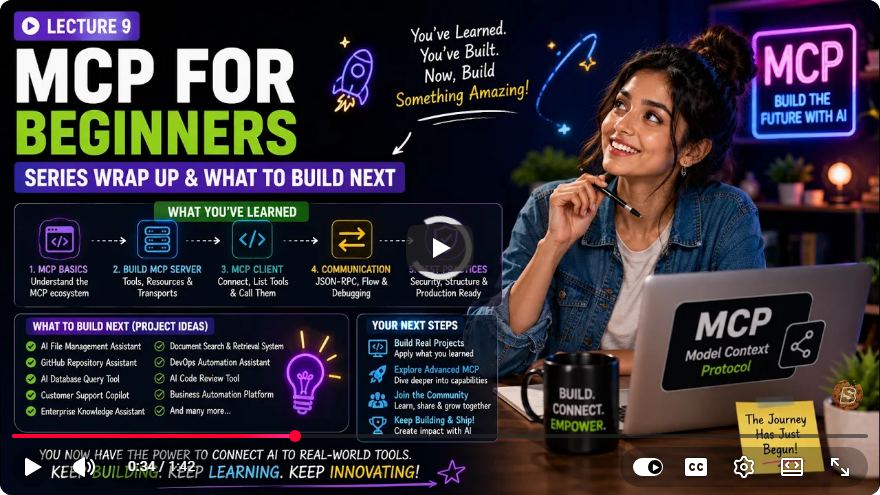
Throughout this course, we have traversed several key topics, all of which are crucial for understanding the Model Context Protocol:
- Core Architecture: We kicked off by understanding the fundamental structure of MCP.
- Building an MCP Server: Hands-on experience in creating a server that adheres to the MCP standards.
- Tools and Resources: We explored the various tools and data resources that the AI can utilize.
- Optimization: Techniques for debugging and networking were introduced to enhance your server's performance.
- Complete Client Integration: Finally, we brought all components together to create a functional client.
Key Concepts of the Model Context Protocol
As you continue your journey with MCP, it's vital to remember the three core primitives that underpin the protocol:
- Tools: These represent executable actions that the AI can perform, such as creating or deleting a note.
- Resources: These are the data points the AI can retrieve, like reading a list of notes.
- Transports: This refers to how messages are transmitted. For local environments, you can use standard input/output (STDIO), while streamable HTTP is ideal for remote or cloud-based applications.
The Complete Architecture
The architecture of an MCP application can be visualized as follows:
- Host: Initiates requests.
- Client: Manages communication via specific transport methods.
- MCP Server: Provides the necessary tools and resources.
This architecture ensures that all components work harmoniously, facilitating efficient communication and functionality.
Future Projects to Consider
Now that you have a foundational understanding of MCP, it's time to put your skills to the test. Here are some project ideas that can help you further master the Model Context Protocol:
Extend Your Server: Build upon your existing server by adding new features or integrating additional tools and resources.
Custom React Frontend: Create a custom front end using React to act as a host for your MCP server. This will enhance your understanding of client-server communication.
Integrate with Existing Tools: Consider integrating your MCP server with tools like Quad Desktop or Cursor. This integration will provide a real-world application of MCP concepts.
Build Something You Need: The most effective way to cement your understanding of MCP is to build something personally useful. Whether it's an app for managing tasks, notes, or any personal project, the key is to apply what you've learned in a meaningful way.
Quick Start Summary
To recap, here are the essential concepts we covered in this course:
- Mental Model: Understanding the core components and how they interact.
- Architectural Pillars: Tools, resources, and transports form the bedrock of the MCP.
- Road Map to Mastery: Practice by building projects that interest you, as real-world application solidifies your learning.
Conclusion
Thank you for joining us on this educational journey through the Model Context Protocol. We hope this course has provided you with valuable insights and practical skills to advance your programming endeavors. As you move forward, remember to experiment, explore, and most importantly, build something that excites you. If you found this content helpful, don't forget to like and subscribe for more educational resources!
Unlock your potential today and explore more at Skill Bakery. Happy coding!
Connect with SkillBakery Studios
Explore more tutorials, tools, and resources:
Posted by SkillBakery Studios


 Hello, my name is Jack Sparrow. I'm a 50 year old self-employed Pirate from the Caribbean.
No comments:
Post a Comment