
Lecture-5: RAG for Beginners: What Are Vector Databases? | Explained Simply with Real Examples
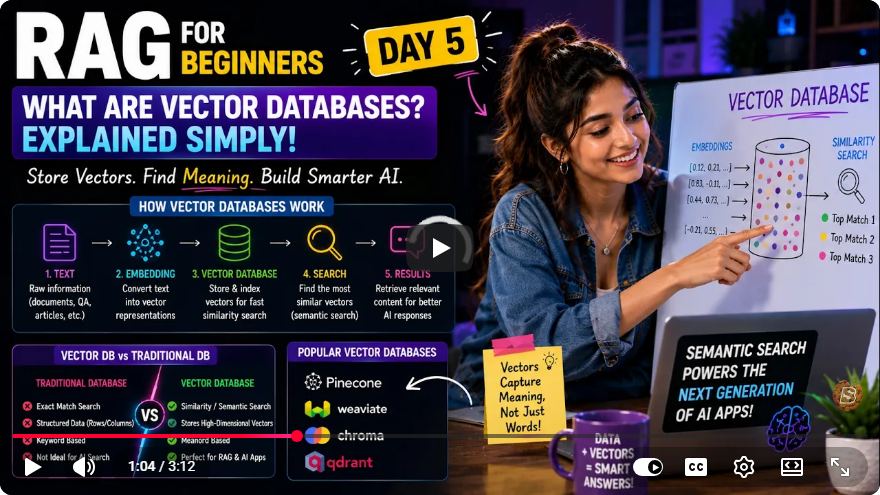
Understanding Vector Databases: A Beginner's Guide
Welcome to our comprehensive guide on vector databases, inspired by the insightful "Lecture-5: RAG for Beginners" video. In this tutorial, we will explore the necessity of vector databases, their functionality, and how they differ from traditional databases. By the end, you’ll have a solid understanding of how to leverage vector databases for semantic searching and relevant applications.
Why Vector Databases?
Limitations of Traditional Databases
Traditional databases are designed for exact matches. They excel in scenarios where you need to retrieve data using specific identifiers, such as an email address or a product ID. However, they falter when tasked with finding items based on semantic meaning.
For instance, if you ask a traditional database to find movies similar to "Inception," it cannot comprehend the nuanced relationships between different titles. This limitation arises because traditional databases operate on structured data organized in rows and columns, which is ill-suited for understanding the semantic context of information.
The Role of Vector Databases
Vector databases address these limitations by storing data in the form of embeddings—arrays of numbers that represent semantic content. Instead of relying on exact matches, vector databases focus on the mathematical closeness of these embeddings, enabling them to find items that are similar in meaning.
How Vector Databases Work
The Workflow
The typical workflow for a vector database involves several key steps:
Store Data as Content-Embedding Pairs: Each piece of content (like a movie description) is stored alongside its corresponding embedding (a numerical representation).
Receive a User Query: When a user submits a query, the system converts the question into an embedding.
Calculate Closeness: The database performs calculations to determine how closely the query embedding aligns with stored embeddings.
Return Results: Based on the calculated distances, the database returns the most relevant results.
Measuring Closeness: Cosine Similarity
To gauge the similarity between embeddings, vector databases utilize a mathematical concept called cosine similarity. While you don’t need to delve into complex math, it's crucial to understand the core rule: a lower distance between two vectors indicates a more similar meaning.
The cosine similarity measures the angle between vectors in a multi-dimensional space. Here’s a simplified formula for calculating cosine similarity:
cosine_similarity(A, B) = (A • B) / ||A|| ||B||
Where:
- (A) and (B) are the two vectors.
- (•) represents the dot product of the vectors.
- (||A||) and (||B||) are the magnitudes of the vectors.
Practical Applications of Vector Databases
A vector database is a high-performance engine capable of storing and searching through millions of content-embedding pairs simultaneously. Here are a few popular vector database options:
Pinecone: A managed service that's easy to set up and use, making it suitable for developers looking for a hassle-free solution.
Weaviate and Qdrant: Feature-rich, open-source options that offer high performance and extensive capabilities.
Chroma: An open-source favorite for local development.
Supabase PG Vector: An extension for PostgreSQL that allows you to use vector embeddings. It’s free to start and works seamlessly with existing SQL knowledge.
For beginners and developers familiar with SQL, Supabase with PG Vector is an excellent choice due to its accessibility and integration with familiar technologies.
Setting Up Your Environment
In the video, the instructor emphasized the importance of having a clean project structure and environment variables prepared for the next coding phase. Here’s how you can set up your development environment:
Choose a Vector Database: Depending on your project requirements, select one of the vector databases mentioned above.
Set Up Environment Variables: Create a
.envfile in your project directory to manage configuration settings.Prepare Core Scripts: Develop scripts that generate and pair text with embeddings for your application.
Here’s a simple structure you might consider for your project:
/my-project
│
├── .env                # Environment variables
├── README.md           # Project documentation
├── src                 # Source code directory
│   ├── main.py         # Main application script
│   └── utils.py        # Utility functions for embeddings
└── requirements.txt    # Dependency management
Conclusion
Vector databases represent a significant advancement in data management, particularly for applications requiring semantic understanding. By leveraging embeddings and cosine similarity, these databases can provide relevant context and enhance search capabilities.
As we conclude this introduction to vector databases, remember that the choice of database depends on your specific needs and familiarity with existing technologies. We recommend starting with Supabase and PG Vector for an accessible entry point into the world of vector databases.
For further learning, explore the various options available and experiment with integrating vector databases into your projects. Happy coding!
Connect with SkillBakery Studios
Explore more tutorials, tools, and resources:
Posted by SkillBakery Studios


 Hello, my name is Jack Sparrow. I'm a 50 year old self-employed Pirate from the Caribbean.
No comments:
Post a Comment