
50. Python Essentials: String Objects in Python: Exploring String Manipulation and Operations
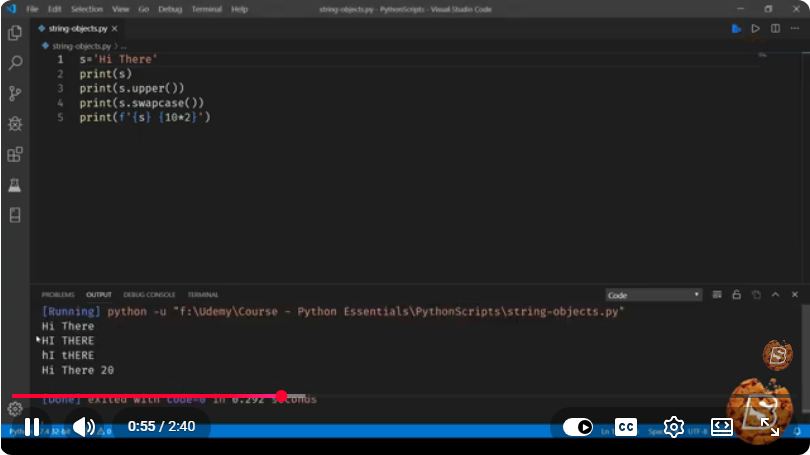
Python Essentials: Understanding String Objects and Their Manipulation
In the world of programming, strings are one of the most fundamental data types. They are essential for handling text input and output in Python. In this blog post, we’ll explore string objects in Python, focusing on string manipulation and operations, as highlighted in the brief but informative YouTube video titled "Python Essentials: String Objects in Python: Exploring String Manipulation and Operations."
What Are String Objects in Python?
In Python, a string is a sequence of characters enclosed within single quotes ('), double quotes ("), or triple quotes (''' or """). Strings are immutable, meaning once they are created, they cannot be altered. This immutability has implications for memory management and performance.
Creating Strings
You can create strings in several ways:
# Using single quotes
string1 = 'Hello, World!'

# Using double quotes
string2 = "Python is fun!"

# Using triple quotes for multi-line strings
string3 = '''This is a
multi-line string.'''
String Operations
Python provides various built-in operations for string manipulation. Let’s delve deeper into some of the most commonly used operations.
1. String Concatenation
Concatenation refers to joining two or more strings together. You can achieve this using the + operator.
first_name = "John"
last_name = "Doe"
full_name = first_name + " " + last_name
print(full_name)  # Output: John Doe
2. String Repetition
You can repeat strings using the * operator.
repeat_string = "Hello! " * 3
print(repeat_string)  # Output: Hello! Hello! Hello!
3. String Slicing
Slicing allows you to access a specific portion of a string. You can do this using the syntax string[start:end].
text = "Python Programming"
slice_text = text[0:6]  # Extracts 'Python'
print(slice_text)       # Output: Python
4. String Length
To find out the length of a string, use the built-in len() function.
message = "Hello, World!"
length = len(message)
print(length)  # Output: 13
5. String Methods
Python strings come with a variety of built-in methods that allow you to manipulate text easily. Here are a few useful methods:
upper(): Converts all characters to uppercase.print(message.upper()) # Output: HELLO, WORLD!lower(): Converts all characters to lowercase.print(message.lower()) # Output: hello, world!strip(): Removes whitespace from both ends of a string.whitespace_string = " Hello, World! " print(whitespace_string.strip()) # Output: Hello, World!replace(old, new): Replaces occurrences of a substring within a string.new_message = message.replace("World", "Python") print(new_message) # Output: Hello, Python!split(delimiter): Splits a string into a list based on a delimiter.words = message.split(", ") print(words) # Output: ['Hello', 'World!']
Conclusion
String manipulation is a vital skill for anyone working with Python. Understanding how to create and manipulate strings can help you handle a wide array of text-processing tasks. In just a few minutes, we explored how to create strings, perform operations like concatenation and slicing, and utilize various string methods to manipulate text effectively.
Whether you're a beginner or an experienced developer, mastering string objects and their operations will enhance your Python programming skills. Keep experimenting with these concepts, and you'll soon find yourself adept at handling strings in your applications!
For further exploration, you can watch the original video here to see these concepts in action. Happy coding!
Connect with SkillBakery Studios
Explore more tutorials, tools, and resources:
Posted by SkillBakery Studios


 Hello, my name is Jack Sparrow. I'm a 50 year old self-employed Pirate from the Caribbean.
No comments:
Post a Comment