
JavaScript ES6 - Collection - Sets - Web development
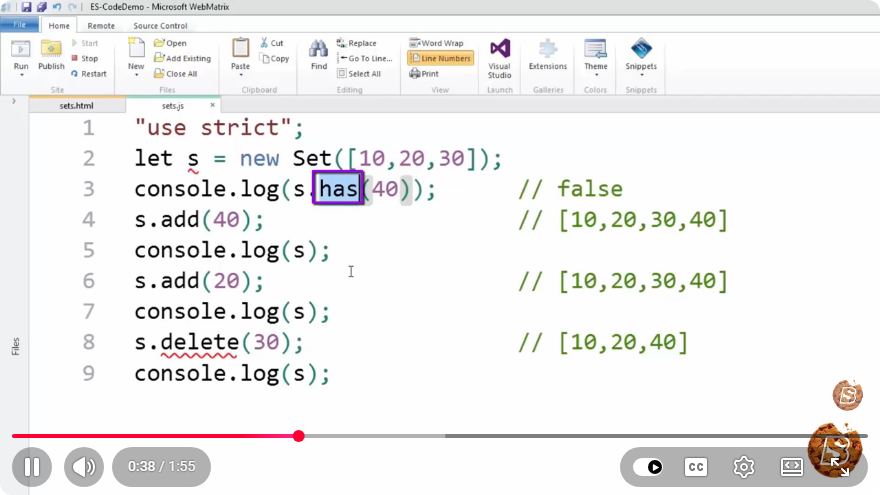
Understanding JavaScript ES6 Sets: A Quick Guide
In the realm of JavaScript, ES6 brought about significant enhancements that made working with data collections easier and more efficient. One of these advancements is the introduction of Sets. In this post, we’ll dive into what Sets are, how they differ from arrays, and how you can utilize them in your web development projects.
What is a Set?
A Set is a built-in object in JavaScript that allows you to store unique values of any type, whether primitive or reference values. Unlike arrays, Sets do not allow duplicate values, making them ideal for scenarios where you need to maintain a collection of unique items.
Key Characteristics of Sets:
- Uniqueness: Each value in a Set must be unique.
- Order: Sets maintain the order of insertion, meaning that values will be iterated in the order they were added.
- Automatic Type Conversion: Sets use the SameValueZero algorithm for comparisons, which means NaN is considered equal to NaN.
Creating a Set
Creating a Set in JavaScript is straightforward. You can instantiate a new Set using the Set constructor:
const mySet = new Set();
You can also initialize a Set with an array or another iterable:
const numberSet = new Set([1, 2, 3, 4, 4]); // The second '4' will be ignored
Basic Set Operations
Sets come with a variety of methods that allow you to manipulate and interact with their stored values.
Adding Values
To add values to a Set, use the .add() method:
mySet.add(1);
mySet.add(2);
mySet.add(2); // This will not be added since it's a duplicate
console.log(mySet); // Output: Set { 1, 2 }
Checking Existence
To check if a value exists in a Set, use the .has() method:
console.log(mySet.has(1)); // Output: true
console.log(mySet.has(3)); // Output: false
Deleting Values
To remove a specific value from a Set, use the .delete() method:
mySet.delete(1);
console.log(mySet); // Output: Set { 2 }
Clearing the Set
If you want to remove all values from a Set, use the .clear() method:
mySet.clear();
console.log(mySet); // Output: Set {}
Iterating Over a Set
You can iterate over Sets using the forEach() method or the for...of loop:
const mySet = new Set([1, 2, 3]);

mySet.forEach(value => {
  console.log(value); // Output: 1, 2, 3
});

// Using for...of
for (const value of mySet) {
  console.log(value); // Output: 1, 2, 3
}
Use Cases for Sets
Sets are particularly useful in various scenarios, including:
- Removing duplicates: Easily filter out duplicate values from an array.
const numbers = [1, 2, 2, 3, 4, 4];
const uniqueNumbers = [...new Set(numbers)];
console.log(uniqueNumbers); // Output: [1, 2, 3, 4]
- Membership checks: Efficiently check for the presence of items in a collection.
- Data aggregation: Gather unique entries from different sources.
Conclusion
JavaScript Sets provide an excellent way to handle collections of unique values with straightforward syntax and powerful methods. By understanding how to use Sets effectively, you can streamline your data handling processes and enhance the functionality of your web applications.
For more intricate examples and real-world applications, consider exploring additional resources or experimenting with Sets in your projects. Happy coding!
Connect with SkillBakery Studios
Explore more tutorials, tools, and resources:
Posted by SkillBakery Studios


 Hello, my name is Jack Sparrow. I'm a 50 year old self-employed Pirate from the Caribbean.
No comments:
Post a Comment