
Lecture-1: MCP Explained for Beginners | What is Model Context Protocol?
Unlocking the Model Context Protocol (MCP) for Beginners: A Comprehensive Guide
In the rapidly evolving landscape of AI, the need for standardized communication between AI tools and external data sources has never been more crucial. Enter the Model Context Protocol (MCP)—a game-changing framework designed to streamline this interaction. In this blog post, we will delve into the fundamentals of MCP, its architecture, and how you can start building an MCP server using NodeJS and Express.
What is the Model Context Protocol (MCP)?
MCP serves as a universal connector for AI applications, allowing them to interface seamlessly with various data tools without the headache of writing custom integration code for each scenario. Think of MCP as the USB-C standard for AI—one universal plug that enables connectivity across a multitude of applications.
Why is MCP Important?
In the current landscape, each AI tool typically employs its own proprietary methods for data integration. This lack of standardization leads to significant overhead in development time, as developers must often write custom “glue code” for every single integration. MCP alleviates this problem by providing a standardized protocol that simplifies the process of connecting AI applications to external data sources.
Core Architecture of MCP
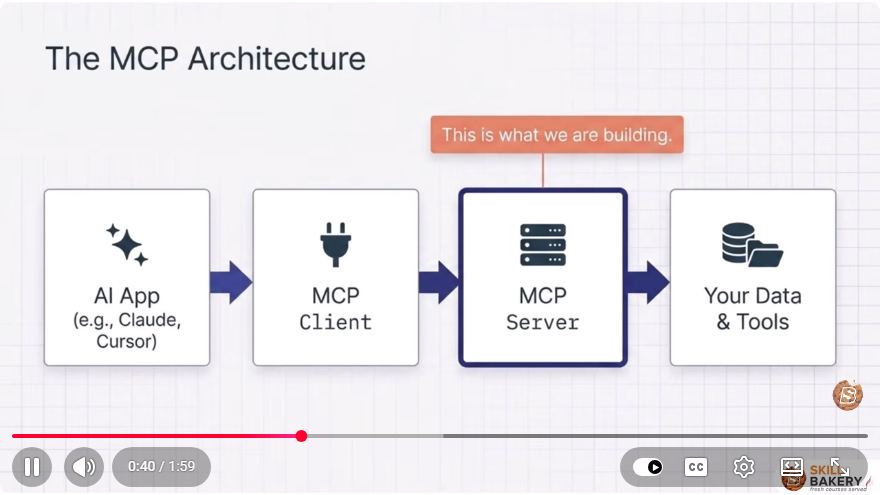
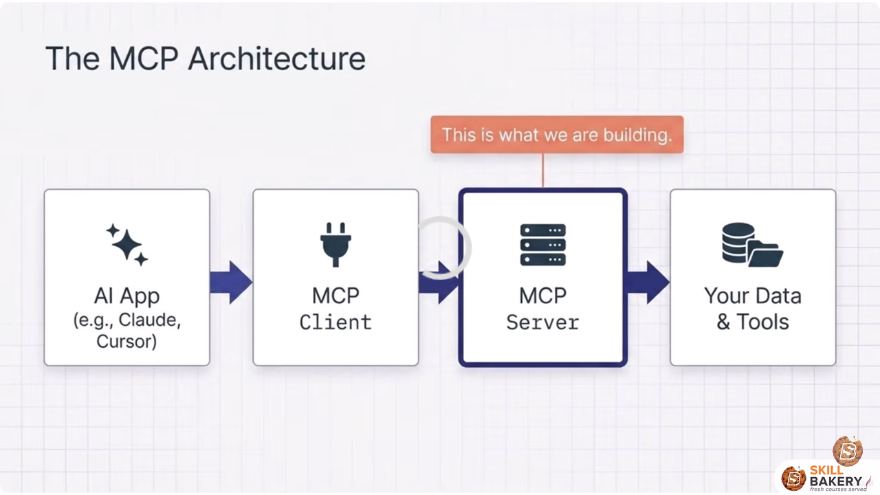
The architecture of MCP consists of two principal components:
- MCP Client: This is the AI application that requires access to external data and tools.
- MCP Server: This is the backend service that facilitates communication between the MCP client and the various data sources.
Building an MCP Server
In this tutorial series, we will focus on building a simple MCP server using NodeJS and Express. Our project will serve as a notes and tasks server, allowing AI applications to call defined tools, register resources for reading, and execute tasks locally.
Prerequisites
Before we dive into the implementation, ensure that you have the following:
- Basic knowledge of JavaScript
- NodeJS installed on your machine
- A code editor of your choice
Project Structure
Here’s the roadmap of our MCP server development:
- Introduction to MCP
- Understanding MCP Core Architecture
- Initial Setup of the Server
- Registration of Tools
- Running the Server
- Handling Transports
- Building Clients
- Next Steps
Initial Setup
To get started, you will need to initialize your NodeJS project. Open your terminal and run the following commands:
mkdir mcp-server
cd mcp-server
npm init -y
npm install express typescript @types/node @types/express ts-node --save-dev
This sets up a new NodeJS project and installs the necessary dependencies, including Express and TypeScript.
Creating the MCP Server
Create a file named server.ts in your project directory. Here’s a simple example of how to set up your Express server:
import express from 'express';

const app = express();
const PORT = process.env.PORT || 3000;

// Middleware to parse JSON
app.use(express.json());

// Sample endpoint for testing
app.get('/api/health', (req, res) => {
  res.status(200).send({ message: 'MCP Server is running!' });
});

// Start the server
app.listen(PORT, () => {
  console.log(`Server is listening on http://localhost:${PORT}`);
});
Running the Server
To run your server, you can use the following command in your terminal:
npx ts-node server.ts
If everything is set up correctly, you should see a message indicating that the server is running. You can test the /api/health endpoint by visiting http://localhost:3000/api/health in your web browser.
Next Steps
Now that you have a basic MCP server running, the next steps involve:
- Registering Tools: Define the actions that your AI can call.
- Handling Transports: Set up how data is sent and received between the client and server.
- Building Clients: Create a simple client that interacts with your MCP server.
Conclusion
The Model Context Protocol is poised to become the standard for AI integration, simplifying the complexities of connecting AI applications to external tools and data. This beginner-friendly tutorial serves as a foundation for building your own MCP server using NodeJS and Express.
Stay tuned for more in-depth videos and articles as we continue to explore the capabilities of MCP and how it can enhance your AI projects. Don’t forget to subscribe to our channel and turn on notifications to stay updated!
If you found this tutorial helpful, please like and share it with your peers. Let's make AI more useful together!
Connect with SkillBakery Studios
Explore more tutorials, tools, and resources:
Posted by SkillBakery Studios


 Hello, my name is Jack Sparrow. I'm a 50 year old self-employed Pirate from the Caribbean.
No comments:
Post a Comment