
Lecture-2: What is Model Context Protocol (MCP)? Complete Beginner's Guide
Understanding the Model Context Protocol (MCP): A Beginner's Guide
Welcome to our comprehensive guide on the Model Context Protocol (MCP), an emerging standard in the AI ecosystem that promises to revolutionize how applications interact with data sources. In this post, we will explore what MCP is, its significance, and how you can start leveraging it in your projects.
What is the Model Context Protocol (MCP)?
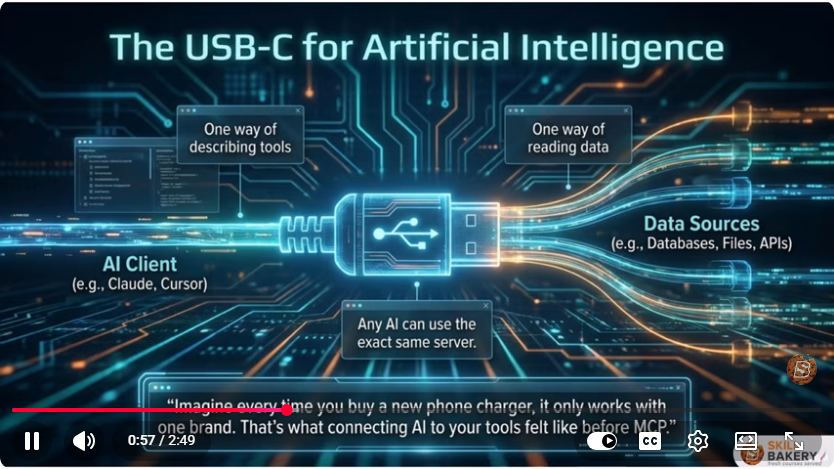
The Model Context Protocol, often referred to as MCP, is an open standard designed to simplify the interactions between AI applications and various external data sources. You can think of MCP as the universal connector for AI, similar to how USB-C has unified charging across devices.
The Problem with Current AI Ecosystem
Currently, the AI landscape is highly fragmented. AI clients such as Claude, Cursor, and OpenAI are required to create custom connections to each database, file source, or external API they wish to interact with. This fragmented approach is not only costly but also inefficient, leading to a chaotic development process.
Enter MCP: The Universal AI Data Protocol
MCP serves as a single interface that allows any AI application to connect seamlessly with any external data source. The introduction of this protocol aims to:
- Remove barriers: MCP eliminates the need for developers to write extensive custom code for every platform, streamlining the development process.
- Accelerate innovation: By providing a unified standard, MCP promotes faster development cycles and easier integration of new technologies.
Key Features of MCP
MCP is built on three foundational pillars that enhance its functionality and usability:
Standardization for Universal Tool Use: Similar to how USB-C allows diverse devices to charge with a single cable, MCP enables multiple AI clients to connect with any data source through one protocol.
Security and Control: MCP keeps API keys local, meaning you never have to expose your sensitive information to external providers. This feature adds a layer of security to your AI applications.
Composability: MCP promotes the use of small, focused microservices. Developers can create modular services that can be easily combined, allowing for flexible and efficient architecture.
The Benefits of Using MCP
By adopting MCP, developers can enjoy several advantages:
Control Over Data: With MCP, you have complete control over what data is passed to your AI models. This means you can ensure that only the necessary information is shared, enhancing privacy and security.
Simplified Development: Instead of writing custom glue code for each platform, you can build a single universal server that interacts with all AI clients. This leads to more stable and maintainable applications.
Rapid Adoption: Major platforms are already beginning to adopt MCP, and the library of ready-made servers is expanding quickly. This rapid growth indicates a strong industry trend towards standardization.
Getting Started with MCP
Building Your First MCP Server
Now that we understand the significance of MCP, let's move from concept to code. Although this blog will not provide specific code implementations, we will outline the basic steps to create an MCP server.
Set Up Your Development Environment: Ensure you have the necessary tools and libraries installed in your development environment. This typically includes a programming language (like Python or JavaScript) and a web framework.
Create a Basic Server: Use your preferred framework to create a simple server. The server will listen for incoming requests and respond according to the MCP standard.
# Example in Python using Flask
from flask import Flask, request, jsonify

app = Flask(__name__)

@app.route('/mcp', methods=['POST'])
def mcp_endpoint():
    data = request.json
    # Process the incoming data and interact with your AI model
    return jsonify({"status": "success", "data": data})

if __name__ == '__main__':
    app.run(debug=True)
Bind to the MCP Standard: Ensure your server adheres to the MCP specifications. This includes defining how data is formatted and the protocols your server will support.
Deployment: Once your server is ready, deploy it to a cloud service or your local environment.
Connect to AI Clients: With your MCP server deployed, any AI client that supports the protocol can interact with your server without additional configuration.
Conclusion
The Model Context Protocol (MCP) is set to transform the AI landscape by providing a unified, efficient way for applications to interact with data sources. By embracing this standard, developers can simplify their workflows, enhance security, and accelerate innovation.
In our next post, we will dive deeper into the core architecture of MCP and provide practical lessons, including complete code examples. Make sure to subscribe to our blog and turn on notifications to stay updated!
If you found this guide helpful, please share it with your fellow developers or anyone interested in the future of AI integration. Let’s make AI actually useful together!
Connect with SkillBakery Studios
Explore more tutorials, tools, and resources:
Posted by SkillBakery Studios


 Hello, my name is Jack Sparrow. I'm a 50 year old self-employed Pirate from the Caribbean.
The Model Context Protocol is an important development in AI integration because it provides a standardized way for AI applications to interact with external tools and data sources. Its focus on interoperability, modular architecture, and controlled data access can reduce the effort required to build integrations for different AI platforms. Understanding how MCP works is becoming valuable for developers building practical AI-powered applications.
ReplyDeleteLearning how to work with AI development tools can help developers explore MCP servers, connect external services, and create more capable AI workflows. Claude Certified Developer Training can be relevant for developers who want to explore Claude-based development and AI tool integration, including approaches to connecting models with external capabilities.
MCP also highlights the importance of designing AI applications with cle
MCP also highlights the importance of designing AI applications with clear permissions, secure credential handling, and carefully controlled access to external resources. Developers can use AI assistants to accelerate implementation while still validating integrations, testing security boundaries, and reviewing generated code. Exploring ChatGPT Developer Training can help developers understand how to incorporate AI-assisted development into their software engineering workflows.
ReplyDelete