
Lecture-3: MCP Architecture Explained Simply | Hosts, Clients, Servers, Tools & Resources
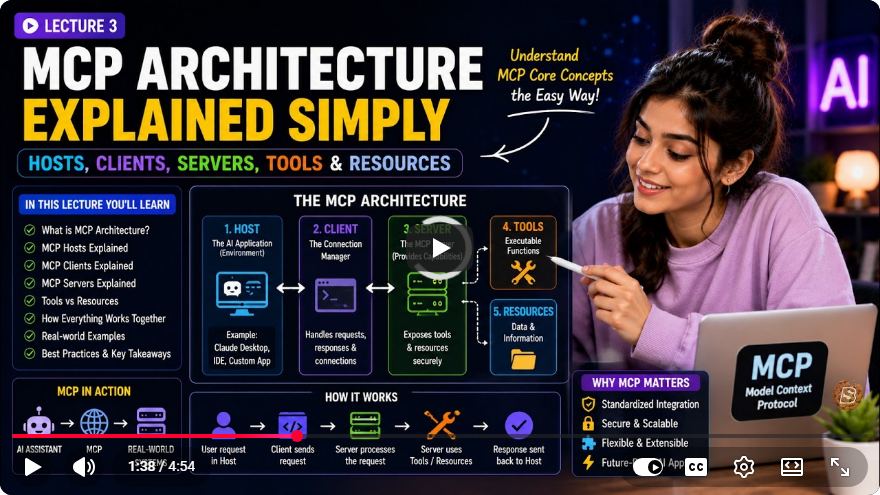
Understanding MCP Architecture: A Deep Dive into Hosts, Clients, and Servers
In the ever-evolving landscape of artificial intelligence (AI), understanding the underlying architecture that facilitates communication between different components is essential. One such architecture is the Model Context Protocol (MCP), which enables seamless interaction among various AI tools and data connections. In this blog post, we will break down the MCP architecture in simple terms, exploring the roles of hosts, clients, and servers, as well as the essential primitives that drive their interactions.
What is MCP?
The Model Context Protocol (MCP) is not merely a mysterious black box; it is a structured communication framework among three distinct architectural players: hosts, clients, and servers. By comprehending the dynamics of these roles, developers can better utilize the capabilities of AI systems and realize the full potential of their applications.
The Key Players in MCP Architecture
Host: The Host is the AI application that users interact with. Examples include popular applications like Quad Desktop or Visual Studio Code. Think of the Host as the "boss" that determines which servers to connect to.
Client: The Client operates as the internal communicator, managing the protocol conversation between the Host and the Server. In our restaurant analogy, the Client is akin to the waiter, responsible for relaying orders from the dining room (Host) to the kitchen (Server).
Server: The Server is a custom program designed to expose specific capabilities. In our analogy, the Server represents the kitchen, where the actual tasks are executed based on the orders received.
The Relationships Between Players
Understanding the relationships between these players is crucial:
- Client-to-Server Connection: Each Host creates one Client to connect to a specific Server, ensuring a dedicated and secure connection for every tool or data source. This one-to-one relationship guarantees that communication is efficient and organized.
The Primitives of MCP
For a Server to effectively communicate with a Host, it must expose three primary primitives or capabilities:
Tools: These are the actions or functions that the AI can perform. For instance, consider functions like
add_taskormark_task_donewithin a notes and tasks server.Resources: Representing read-only data sets, Resources are identified by URIs (Uniform Resource Identifiers). For example, a URI like
note://123would return the content of a specific note.Prompts: These are templates or pre-written instructions that guide the AI on how to initiate specific conversation contexts. An example could be a
daily_summaryprompt, instructing the AI on how to summarize tasks for the day.
How MCP Works in Practice
To illustrate how MCP operates, let's consider a practical example involving a notes and tasks server:
Initiation Steps:
- The user opens the Host.
- The Host creates a Client to connect to the Server.
- A handshaking capability exchange occurs, where the Server communicates the tools and resources it supports.
- The user provides a prompt, such as "add a task to buy milk."
Execution:
- The AI determines which tool to use (e.g.,
add_task). - The Client routes a JSON-RPC request to the Server.
- The Server performs the requested action and returns the result.
- The Host displays the successful result to the user.
- The AI determines which tool to use (e.g.,
Layers of MCP Architecture
The MCP protocol operates on two distinct layers:
Data Layer: This layer represents the meaning of the communication, consisting of JSON-RPC messages that encapsulate tools and resources. The data layer remains consistent across different environments.
Transport Layer: This layer deals with how messages are transmitted. Messages typically travel through standard input/output (STDIO) for local processes or streamable HTTP for remote servers.
Putting It All Together
To summarize the MCP architecture:
- The Host directs the AI and user interface.
- The Client manages the one-to-one connection via the transport layer.
- The Server exposes actionable primitives.
This architecture ensures that data moves reliably from the user's intent to the server's execution. Official SDKs (Software Development Kits) handle the complexities of these interactions, making the development process smoother.
Next Steps: Building an MCP Server
Now that we have a solid understanding of the MCP architecture, it's time to put this knowledge into practice. The next steps involve setting up a real Node.js and TypeScript server, defining our first tools, and running the project locally to observe the protocol in action.
Example Code: Setting Up a Simple MCP Server
Here’s a basic example of how to set up an MCP server using Node.js:
const express = require('express');
const bodyParser = require('body-parser');

const app = express();
app.use(bodyParser.json());

// Define tools (actions)
const tools = {
    add_task: (task) => {
        // Logic to add task
        return `Task "${task}" added successfully.`;
    },
    mark_task_done: (taskId) => {
        // Logic to mark task as done
        return `Task ${taskId} marked as done.`;
    }
};

// Handle requests
app.post('/mcp', (req, res) => {
    const { method, params } = req.body;

    if (tools[method]) {
        const result = tools[method](...params);
        res.json({ result });
    } else {
        res.status(404).json({ error: 'Method not found' });
    }
});

// Start server
const PORT = 3000;
app.listen(PORT, () => {
    console.log(`Server is running on http://localhost:${PORT}`);
});
Conclusion
The Model Context Protocol (MCP) provides a structured framework for building interoperable AI tools and data connections. By understanding the roles of hosts, clients, and servers, as well as the essential primitives they utilize, developers can create more efficient and effective applications. We hope this post has demystified MCP architecture and encourages you to explore building your own servers and tools.
If you found this tutorial helpful, don't forget to subscribe for more insights into AI architectures and development practices!
Connect with SkillBakery Studios
Explore more tutorials, tools, and resources:
Posted by SkillBakery Studios


 Hello, my name is Jack Sparrow. I'm a 50 year old self-employed Pirate from the Caribbean.
The explanation of Model Context Protocol architecture makes it easier to understand how AI applications interact with external tools and data sources. The separation of hosts, clients, and servers, along with the roles of tools, resources, and prompts, provides a useful foundation for building modular AI integrations. Understanding the data and transport layers is also important when designing reliable communication between AI applications and external services.
ReplyDeleteDevelopers can explore how AI assistants use tools, process requests, and integrate with external systems to create practical applications. ChatGPT Developer Online Training in India can help learners understand AI-assisted development workflows and apply these concepts when building intelligent software solutions.
Building MCP servers also requires an understanding of how AI applications communicate with tools and how permissions and data access should be controlled. Learning to work with Claude-based development tools can help developers explore tool integration, structured workflows, and AI application development. Claude Certified Developer Online Training in India is relevant for those looking to develop their skills in Claude-powered applications.
ReplyDelete