
Lecture-13: AI Agents in IT Support | Build Intelligent Autonomous Support Systems with Gen AI
Transforming IT Support with AI Agents: A Comprehensive Guide
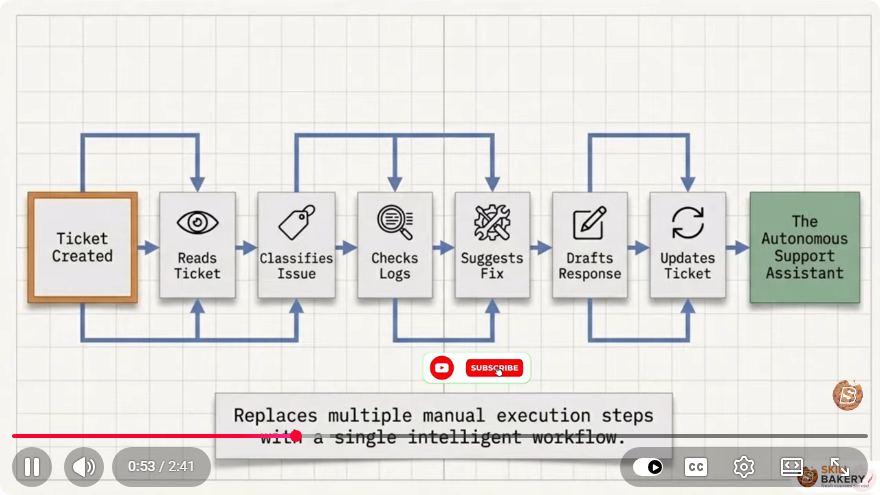
Artificial Intelligence (AI) is rapidly evolving and reshaping various industries, and IT support is no exception. In recent years, AI agents have transitioned from basic chatbots to intelligent autonomous systems that can analyze incidents, make decisions, execute tasks, and collaborate with human support teams. This blog post will explore how AI agents are revolutionizing IT support, the underlying technologies, and practical applications that can enhance operational efficiency.
What Are AI Agents?
AI agents are sophisticated software entities designed to perform specific tasks autonomously. They utilize machine learning algorithms, natural language processing (NLP), and data analytics to interact with users, understand their queries, and provide solutions. Unlike traditional chatbots that rely on predefined responses, AI agents can analyze data, learn from interactions, and adapt their behavior over time.
Key Features of AI Agents in IT Support
Incident Analysis: AI agents can assess incoming support tickets, categorize them based on urgency, and prioritize resolutions accordingly. This capability reduces response times and helps support teams focus on critical issues.
Decision-Making: By leveraging historical data and machine learning models, AI agents can make informed decisions on how to handle specific incidents, often without human intervention.
Task Execution: AI agents can perform routine tasks, such as resetting passwords, configuring systems, and updating software, allowing human agents to concentrate on more complex issues.
Collaboration with Support Teams: AI agents can work alongside human support staff, providing them with insights and recommendations based on real-time data analysis. This collaboration enhances the overall effectiveness of IT support operations.
How AI Agents Are Transforming IT Operations
1. Improved Efficiency
By automating repetitive tasks and providing immediate responses to common queries, AI agents significantly enhance the efficiency of IT support teams. This automation not only reduces the workload for human agents but also improves service delivery by resolving issues faster.
2. Enhanced Customer Experience
AI agents offer 24/7 support, ensuring that users receive assistance at any time. Their ability to provide instant responses improves user satisfaction and builds trust in IT services.
3. Data-Driven Insights
AI agents analyze large volumes of data to identify trends and patterns in incident reports. These insights can inform strategic decisions regarding resource allocation, training needs, and process improvements.
4. Scalability
As organizations grow, so do their IT support needs. AI agents can scale operations without the need to proportionally increase human resources, making them a cost-effective solution for growing businesses.
Implementing AI Agents in IT Support: A Step-by-Step Guide
If you're considering integrating AI agents into your IT support operations, follow these steps to get started:
Step 1: Define Objectives
Identify the specific challenges your IT support team faces and outline the goals you want to achieve with AI agents. This could include reducing response times, improving ticket resolution rates, or enhancing user satisfaction.
Step 2: Choose the Right Tools
Select an AI platform that suits your needs. Popular options include:
- Chatbot frameworks: Tools like Dialogflow or Microsoft Bot Framework for creating conversational agents.
- Machine learning libraries: TensorFlow or Scikit-Learn for building predictive models.
- NLP tools: Libraries like SpaCy or NLTK for processing and understanding natural language.
Step 3: Train Your AI Agent
Feed your AI agent historical data from past incidents to help it learn and adapt. This training process involves curating a dataset that reflects the types of queries and issues your support team encounters.
import pandas as pd
from sklearn.model_selection import train_test_split

# Load historical incident data
data = pd.read_csv('incident_data.csv')

# Prepare data for training
X = data['query']
y = data['resolution']
X_train, X_test, y_train, y_test = train_test_split(X, y, test_size=0.2)
Step 4: Test and Iterate
Before deploying your AI agent, conduct thorough testing to ensure it meets your objectives. Gather feedback from users and support staff, and continuously iterate on the agent's capabilities based on this input.
Step 5: Deploy and Monitor
Once testing is complete, deploy your AI agent into the production environment. Monitor its performance and user interactions to identify areas for improvement.
Conclusion
AI agents are revolutionizing IT support by introducing intelligent, autonomous systems that streamline operations and enhance user experiences. By leveraging the capabilities of AI, organizations can improve efficiency, deliver better customer service, and gain valuable insights into their IT operations. As you consider implementing AI agents in your support systems, remember to define clear objectives, choose suitable tools, and continuously iterate for optimal results.
Embrace the future of IT support with AI agents, and watch as your operations transform for the better!
Connect with SkillBakery Studios
Explore more tutorials, tools, and resources:
Posted by SkillBakery Studios


 Hello, my name is Jack Sparrow. I'm a 50 year old self-employed Pirate from the Caribbean.
No comments:
Post a Comment