
Lecture-4: Text Generation & Text Classification with Hugging Face Inference
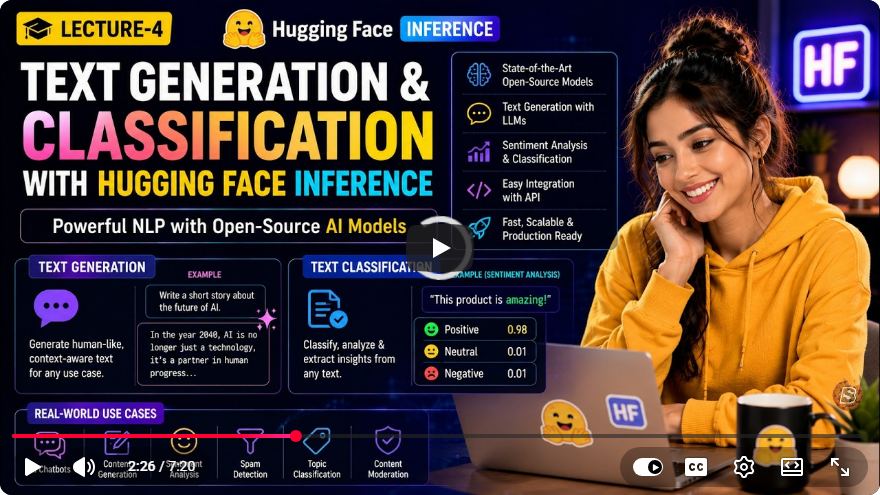
Building Powerful NLP Applications with Hugging Face Inference: A Comprehensive Guide
Natural Language Processing (NLP) has witnessed rapid advancements in recent years, thanks to the availability of sophisticated models and frameworks. One of the most prominent platforms for NLP tasks is Hugging Face, which enables developers to harness the power of state-of-the-art AI models without the hassle of managing infrastructure. In this blog post, we will explore how to perform Text Generation and Text Classification using Hugging Face Inference, as discussed in the fourth lecture of the series.
What is Hugging Face Inference?
Hugging Face provides a user-friendly interface for leveraging pre-trained models in various NLP domains. With Hugging Face Inference, you can easily integrate powerful models into your applications with minimal setup, allowing you to focus on building and deploying your NLP solutions.
Prerequisites
Before we dive into the implementation, ensure you have the following:
- Python installed on your machine (preferably version 3.6 or higher).
- Access to a terminal or command prompt.
- Basic understanding of Python programming and familiarity with NLP concepts.
Setting Up Your Environment
To start using Hugging Face Inference, you'll need to install the transformers library. You can do this with the following command:
pip install transformers
This library provides a wide range of tools for working with pre-trained models.
Text Generation with Hugging Face
Text generation is one of the most exciting applications of NLP, allowing you to create coherent and contextually relevant text based on a given prompt. Here’s how to perform text generation using Hugging Face.
Step 1: Import Required Libraries
from transformers import pipeline

# Initialize the text generation pipeline
text_generator = pipeline('text-generation', model='gpt2')
In this example, we are using the GPT-2 model, a popular choice for generating human-like text.
Step 2: Generate Text
You can generate text by providing a prompt. Here’s how:
# Define a prompt
prompt = "Once upon a time in a land far, far away"

# Generate text
generated_text = text_generator(prompt, max_length=50, num_return_sequences=1)

# Print the generated text
print(generated_text[0]['generated_text'])
In the above code, max_length controls the length of the generated text, and num_return_sequences specifies how many variations you want to generate.
Example Output
You might see an output like this:
"Once upon a time in a land far, far away, there lived a young princess who dreamed of adventure and magic..."
Text Classification with Hugging Face
Text classification involves categorizing text into predefined labels. Hugging Face makes it easy to implement this task using pre-trained models.
Step 1: Initialize the Text Classification Pipeline
# Initialize the text classification pipeline
text_classifier = pipeline('text-classification', model='distilbert-base-uncased-finetuned-sst-2-english')
Here, we're utilizing DistilBERT, a distilled version of BERT that is optimized for speed and efficiency.
Step 2: Classify Text
Once the pipeline is set up, you can classify text inputs as follows:
# Define some texts for classification
texts = [
    "I love sunny days!",
    "I hate it when it rains."
]

# Classify the texts
classification_results = text_classifier(texts)

# Print the classification results
for text, result in zip(texts, classification_results):
    print(f"Text: '{text}' => Sentiment: {result['label']} (Score: {result['score']:.4f})")
Example Output
You might see results such as:
Text: 'I love sunny days!' => Sentiment: POSITIVE (Score: 0.9998)
Text: 'I hate it when it rains.' => Sentiment: NEGATIVE (Score: 0.9987)
Conclusion
In this tutorial, we explored how to build powerful NLP applications using Hugging Face Inference. We covered the essentials of text generation and text classification, highlighting the capabilities of pre-trained models like GPT-2 and DistilBERT.
By leveraging Hugging Face, you can focus on creating innovative NLP solutions without the complexity of managing your own infrastructure. Whether you're looking to generate creative content or analyze sentiments, Hugging Face provides the tools you need to succeed.
Further Reading
Explore these resources to deepen your understanding of NLP and keep up with the latest advancements in the field! Happy coding!
Connect with SkillBakery Studios
Explore more tutorials, tools, and resources:
Posted by SkillBakery Studios


 Hello, my name is Jack Sparrow. I'm a 50 year old self-employed Pirate from the Caribbean.
No comments:
Post a Comment