
Lecture-13: RAG for Beginners: Error Handling in RAG Pipelines | Build Reliable AI Applications
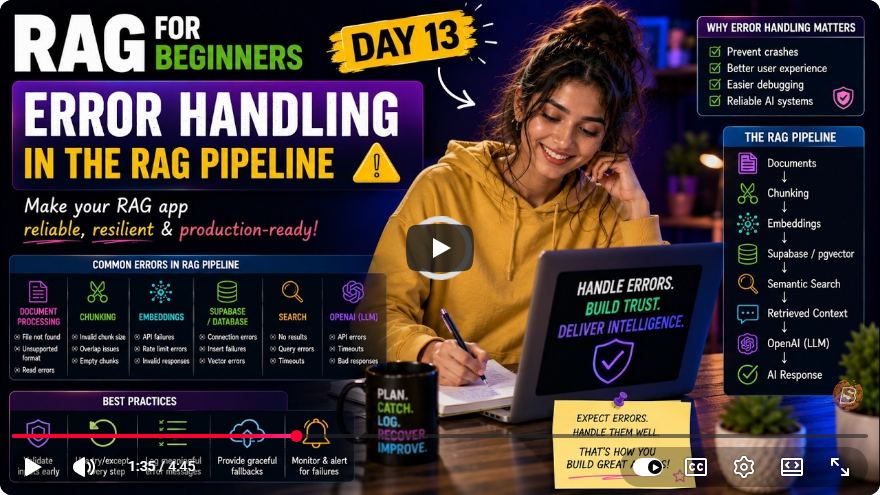
Enhancing Reliability in RAG Pipelines: Error Handling Best Practices
In the world of AI applications, building reliable systems is crucial. While it’s easy to code for the “happy path,” real-world applications must anticipate and gracefully handle failures. In this tutorial, we will explore effective error handling strategies for Retrieval-Augmented Generation (RAG) pipelines, based on insights from the recent lecture series, "RAG for Beginners."
Understanding the Importance of Error Handling
When developing applications that rely on external APIs, such as OpenAI or Superbase, it is vital to implement robust error handling. Situations such as network failures or unexpected API responses can lead to application crashes if not properly managed. This tutorial will guide you through improving error resilience in your existing RAG pipeline.
What We Will Cover
- Enhancing the
embeddings.jsutility. - Creating an
error-handling.jsfile to manage exceptions. - Implementing try-catch blocks effectively.
Step 1: Updating the embeddings.js File
Initial Setup
In your existing embeddings.js file, you have methods to create embeddings using the OpenAI API. Initially, your code may look something like this:
const createEmbeddings = async (input) => {
    const response = await openai.createEmbedding({ input });
    return response.data.embeddings;
};
Adding Error Validation and Handling
To improve this, we need to validate the response from OpenAI and wrap our logic in a try-catch block. Here’s how to do it:
- Validate the Embedding Dimension: Ensure that the embedding dimension is as expected (1536).
- Implement Error Handling: Catch any errors during the API call.
Here’s the updated code:
const createEmbeddings = async (input) => {
    try {
        const response = await openai.createEmbedding({ input });
        const embeddings = response.data.embeddings;

        // Validate the dimension of the embeddings
        if (embeddings.length !== 1536) {
            throw new Error("Invalid embedding dimension received from OpenAI.");
        }

        return embeddings;
    } catch (error) {
        console.error("Failed to create embeddings: ", error.message);
        throw error; // Re-throw for further handling if needed
    }
};
This code now checks for the embedding dimension and captures errors during the API call, allowing your application to respond appropriately rather than crashing.
Step 2: Creating the error-handling.js File
Next, we will create a new file, error-handling.js, which will manage errors at a higher level.
Setting Up the File
Create a new file named loading-error-handling.js. In this file, we will import necessary modules and set up a structure to handle errors effectively.
import { createEmbeddings } from './embeddings';
import { supabase } from './supabaseClient';

const askQuestion = async (question) => {
    try {
        // Attempt to create embeddings
        const embeddings = await createEmbeddings(question);

        // Further processing...
    } catch (error) {
        console.error("Error during question processing: ", error.message);
    }
};

const search = async (query) => {
    try {
        const { data, error } = await supabase.rpc('match_documents', { query });

        if (error) {
            console.error("Supabase error: ", error.message);
            return; // Handle specific cases as needed
        }

        // Process the data if no error
        if (data.length === 0) {
            console.log("No relevant documents found.");
        } else {
            // Logic to display documents
        }
    } catch (error) {
        console.error("Unexpected error: ", error.message);
    }
};
Key Features of the Error Handling File
- Top-Level Try-Catch: Each main function has a
try-catchblock to capture any unexpected errors. - Specific Error Logging: Errors returned from Supabase are handled specifically, allowing for tailored responses.
- Graceful Degradation: The application informs users when there are no relevant documents found.
Conclusion
By implementing proper error handling in your RAG pipeline, you enhance the reliability and usability of your AI application. In this tutorial, we updated the embeddings.js file to validate API responses and catch errors, and we created an error-handling.js file for managing exceptions at a higher level.
In our next lesson, we will explore strategies for managing and ranking multiple matches from the vector database effectively. Stay tuned!
If you found this tutorial helpful, please like and subscribe for more insights on building reliable AI applications!
Connect with SkillBakery Studios
Explore more tutorials, tools, and resources:
Posted by SkillBakery Studios


 Hello, my name is Jack Sparrow. I'm a 50 year old self-employed Pirate from the Caribbean.
No comments:
Post a Comment