
Lecture-14: RAG for Beginners: Query Your Vector Database & Handle Multiple Matches
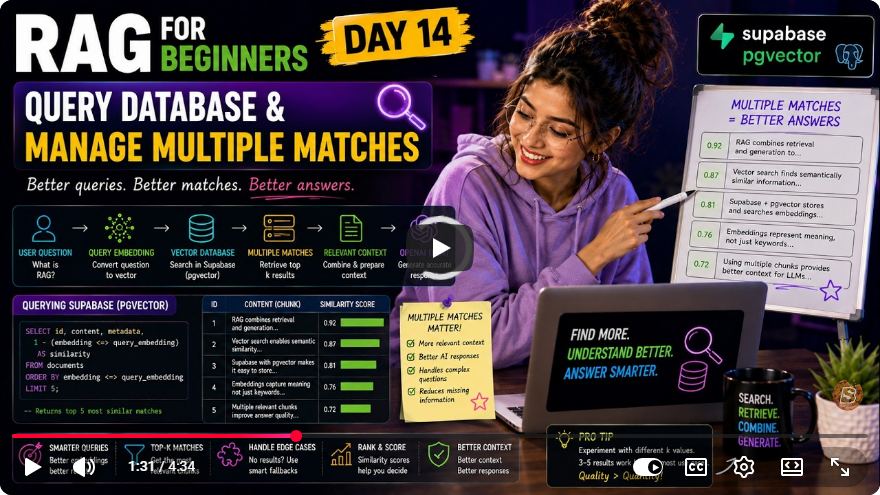
Mastering RAG: Managing Multiple Matches in Vector Databases
Welcome to Day 14 of our RAG (Retrieval-Augmented Generation) for Beginners series! Today, we delve into the essential skill of managing multiple matches from a vector database. In real-world RAG systems, it is common to receive several relevant chunks of data. The challenge lies in effectively ranking, filtering, and intelligently combining these matches to provide the best context for our language model.
What You Will Learn
In this tutorial, we will cover:
- How to query a vector database and handle multiple matches.
- The process of ranking and filtering results based on similarity scores.
- Constructing a clean context to send to a language model.
Setting Up Your Environment
Before we dive into the code, ensure you have the necessary libraries installed. You will need:
- OpenAI SDK for creating embeddings.
- Supabase for managing your vector database.
Creating the File
We will create a new file named manage_multiple_matches.js. This file will contain the logic to manage the multiple matches we retrieve from our vector database.
Importing Required Libraries
At the beginning of your file, include the necessary import statements:
const { createEmbedding } = require('openai');
const { matchDocuments } = require('./supabase');
The Ask Question Function
The core of our functionality resides within the askQuestion method. This method accepts a parameter called question and processes it as follows:
async function askQuestion(question) {
    console.log(`Question: ${question}`);

    // Creating embeddings for the question
    const embedding = await createEmbedding(question);

    // Calling the match documents RPC in Supabase
    const { data, error } = await matchDocuments(embedding);

    if (error) {
        console.error('Error fetching documents:', error);
        return;
    }

    if (!data.length) {
        console.log('No documents returned.');
        return;
    }

    // Sort documents by similarity
    const sortedMatches = data.sort((a, b) => b.similarity - a.similarity);
    console.log('Matches ranked by similarity:', sortedMatches);
Filtering Matches Based on Similarity
Once we have our sorted matches, we need to filter out weaker matches and retain only the strongest ones. In our example, we keep matches with a similarity greater than 0.25.
    // Keeping only the strongest matches
    const strongMatches = sortedMatches.filter(match => match.similarity > 0.25);

    // Fallback to top 3 matches if no strong matches found
    const finalMatches = strongMatches.length > 0 ? strongMatches : sortedMatches.slice(0, 3);
    console.log('Selected matches:', finalMatches);
Building Context for the Language Model
Now that we have our final matches, we need to build a clean context to send to the language model. This involves creating a prompt that combines the selected matches with the original question.
    // Constructing the context for the language model
    const context = finalMatches.map(match => match.chunk).join('\n');
    const prompt = `${context}\n\nQuestion: ${question}\nAnswer:`;
Fetching the Response from OpenAI
Finally, we pass our prompt to the OpenAI API and log the response.
    // Sending the prompt to OpenAI API
    const response = await openai.chat.completions.create({
        model: 'gpt-4-o',
        messages: [{ role: 'user', content: prompt }]
    });

    console.log('AI Response:', response.choices[0].message.content);
}
Running the Code
To execute your file, you can use the terminal:
node manage_multiple_matches.js
Example Usage
Suppose we ask, "What is the movie Inception about? And what themes does it explore?" The system will log the question, search for relevant documents, and retrieve matches. Here's how it might look:
Question: What is the movie Inception about? And what themes does it explore?
Matches ranked by similarity: [{ chunk: "Inception explores...", similarity: 0.464 }, ...]
Selected matches: ["Inception is about...", ...]
AI Response: The movie Inception is about a skilled thief named Dom Cobb...
Conclusion
By managing multiple matches effectively, we gain better control over the quality of the context sent to the AI. This approach ensures that we provide the most relevant and informative responses based on user queries.
As we approach the final days of our course, we will soon build a complete AI chatbot proof of concept. Stay tuned for Day 15!
If you found this tutorial helpful, please like and subscribe to our channel for more insightful content. Happy coding!
Connect with SkillBakery Studios
Explore more tutorials, tools, and resources:
Posted by SkillBakery Studios


 Hello, my name is Jack Sparrow. I'm a 50 year old self-employed Pirate from the Caribbean.
No comments:
Post a Comment