
Lecture-7: MCP Transports Explained | stdio vs Streamable HTTP – Which Should You Use?
Understanding MCP Transport Architectures: STDIO vs Streamable HTTP
In the world of AI tools and server-client communication, the choice of transport is crucial. In this blog post, we will explore the two primary transport architectures outlined in a recent lecture on the Model Context Protocol (MCP): STDIO (Standard Input/Output) and Streamable HTTP. We will delve into their characteristics, use cases, and a seamless transition between the two architectures.
What is the Model Context Protocol (MCP)?
The Model Context Protocol is a framework that dictates how messages and resources are exchanged between clients and servers. At its core, the protocol remains consistent, while the transport method can vary. Think of an MCP message as a letter inside an envelope—regardless of how that envelope is delivered, the message remains unchanged.
Transport Architectures Explained
1. STDIO: The Local Transport Architecture
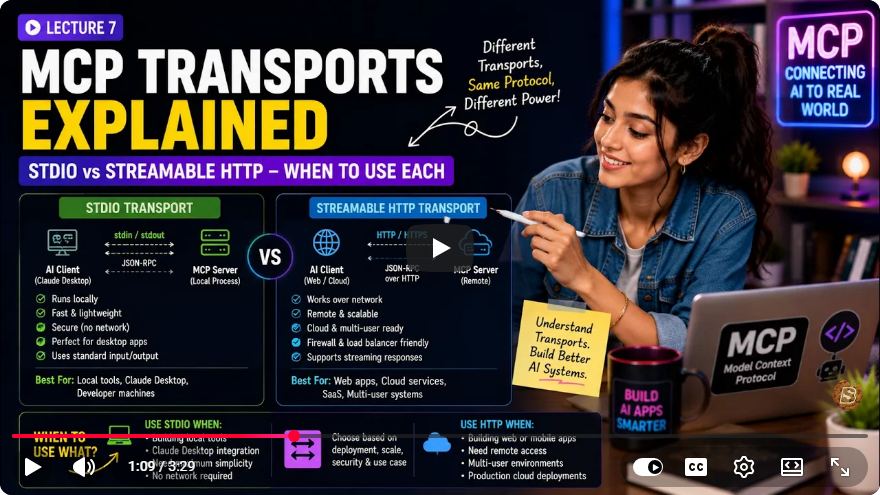
STDIO is a local transport architecture where communication occurs directly between the client and the server without any networking overhead. Here are some key points about STDIO:
Connection Method: The client application (like Cloud Desktop or VS Code) launches the server as a child process. Communication happens through STDIN (standard input) and STDOUT (standard output).
User Limitations: This model supports a one-to-one connection, meaning that only a single client can communicate with the server at any given time. This makes it ideal for local development or personal tools confined to a single machine.
Security: STDIO inherits the operating system's user permissions, making it suitable for personal and secure uses without needing additional authentication layers.
Use Case: If you're developing a tool that you intend to run locally for personal use or testing, STDIO is a suitable choice.
2. Streamable HTTP: The Remote Transport Architecture
Streamable HTTP, on the other hand, is designed for remote communications. Here’s what makes it distinct:
Connection Method: The server operates as a standalone web service, often built on frameworks like Express. The client sends an HTTP POST request, and the server responds with a streamed output.
Concurrency: Unlike STDIO’s one-to-one limitation, Streamable HTTP supports multiple users, allowing for a one-to-many connection topology. This feature is essential for cloud deployments, Software as a Service (SaaS) products, and services requiring user authentication.
Security: Streamable HTTP requires dedicated authentication layers, as it operates over the internet or intranet, leading to different security concerns compared to local transport.
Use Case: If your application needs to be accessible by multiple users or hosted in the cloud, Streamable HTTP is the appropriate transport to choose.
Choosing Between STDIO and Streamable HTTP
When deciding which transport to use, consider the following diagnostic matrix:
| Feature | STDIO | Streamable HTTP |
|---|---|---|
| Network | None, local only | Requires internet/intranet |
| Concurrency | One client per process | Highly concurrent |
| Hosting | Desktop applications | Cloud servers (AWS, Vercel) |
| Security | Inherits OS permissions | Requires dedicated auth |
Architectural Decisions
Your hosting requirements will largely dictate your choice of transport. If the tool is for personal use on your computer, deploy via STDIO. Conversely, if it needs to be accessible by others or run on the cloud, you must use Streamable HTTP.
Typical Development Trajectory
Most developers follow a specific trajectory during their tool development:
- Rapid Prototyping: Start with STDIO for quick testing and validation of your logic.
- Migration to HTTP: Once the logic is confirmed, migrate to Streamable HTTP for production deployment. This migration is seamless as there are no protocol changes when switching from local to remote.
Next Steps: Building an MCP Client
Now that you have a foundational understanding of transport architectures, it’s time to take action. Here are your next steps:
- Build a Simple MCP Client: Start by creating a local application that communicates with your server using STDIO.
- Wrap Your Server: Once comfortable, wrap your notes and tasks server in an Express JS instance to expose local tools over the web.
By following these steps, you will effectively transition from a local setup to a fully functional web service.
Conclusion
Understanding the nuances of transport architectures is vital for developing effective AI tools. Whether you choose STDIO for local projects or Streamable HTTP for cloud applications, each has its strengths and suitable applications. As you grow your skills in building client-server architectures, remember that your choice of transport will influence your tool's accessibility, security, and concurrency.
If you found this post informative, feel free to leave comments or share your thoughts on your experiences with STDIO and Streamable HTTP! Happy coding!
Connect with SkillBakery Studios
Explore more tutorials, tools, and resources:
Posted by SkillBakery Studios


 Hello, my name is Jack Sparrow. I'm a 50 year old self-employed Pirate from the Caribbean.
No comments:
Post a Comment